Can You Make an Older Garage Door Opener Smart?
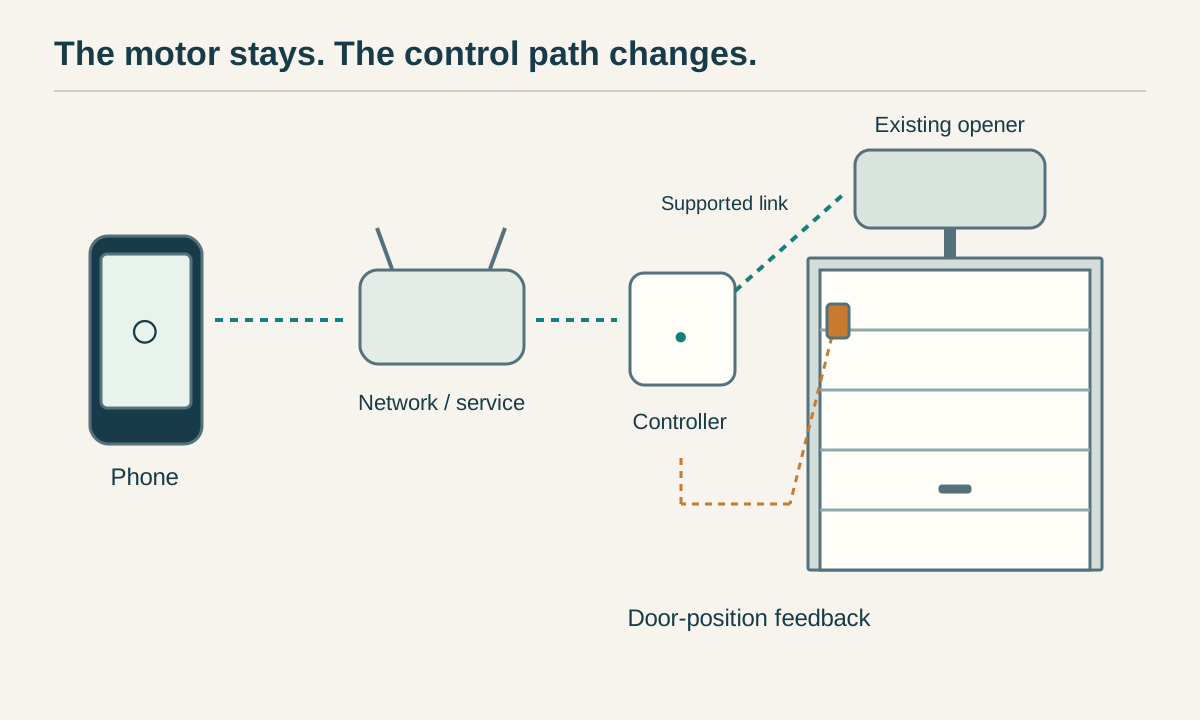
Yes, many older garage door openers can gain phone control without replacing the motor. A compatible retrofit controller adds the connection, while the existing opener still moves the door. The right answer depends on the exact opener, its safety equipment, the door type and the controller model, not simply its age or brand.
Start with compatibility, not a shopping cart. A working remote does not prove that an app controller will work, and two wall-button wires do not prove that an opener accepts a simple relay.
 Open full diagram
First decide whether this opener should be upgraded
A good candidate operates reliably from its existing controls, has working photoelectric safety sensors, and passes the safety-reversal checks in its own manual. Its door travels normally without binding, damaged hardware or a tendency to fall. A smart controller will not repair any of those faults.
If the door is crooked, a spring is broken, a cable is loose or the opener cannot complete its safety tests, stop using automatic operation and arrange service. Do not increase force, bypass the sensors or use a controller to get around a fault. Door springs, cables and bottom brackets are not part of a smart-control retrofit.
For the common North American retrofit products discussed here, very old equipment deserves particular caution. Genie excludes openers made before January 1, 1993 and any opener without safety beams from Aladdin Connect compatibility. Chamberlain describes Smart Garage Control as intended for supported openers manufactured after 1993. These are product eligibility limits, not a guarantee that every newer opener is suitable.
Check the door type before the opener brand
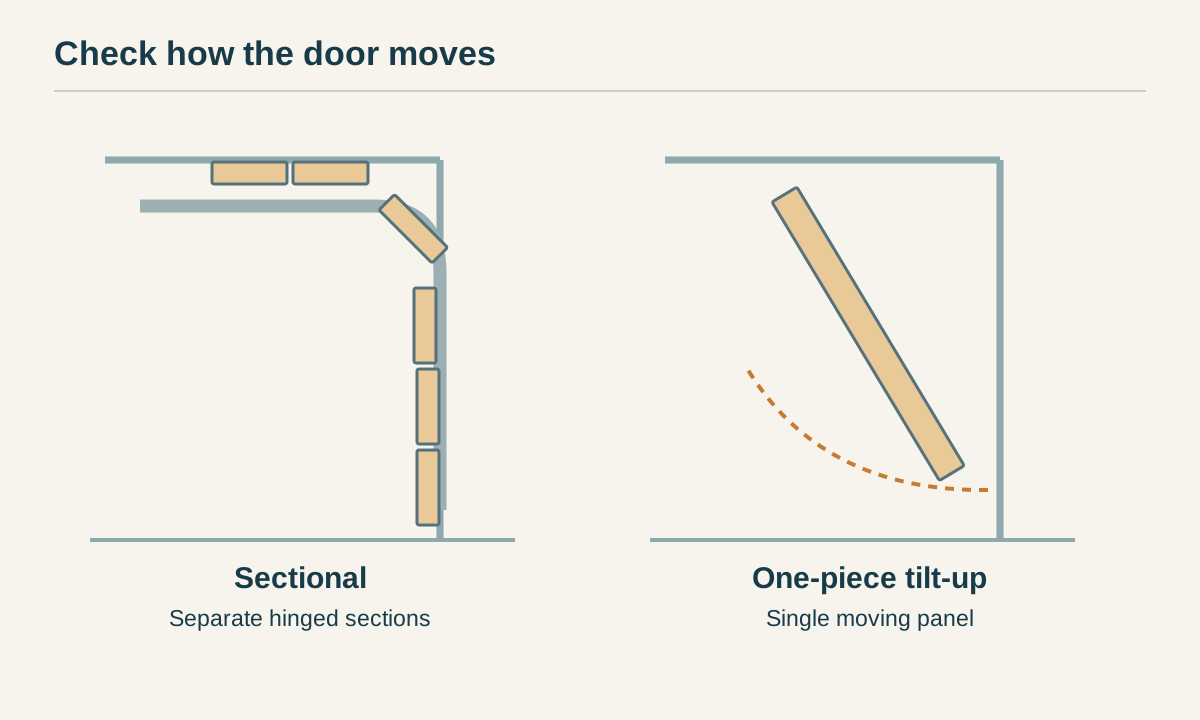
A sectional door has several hinged horizontal sections that follow the tracks as it opens. A one-piece tilt-up door moves as a single panel. Chamberlain Smart Garage Control requires a sectional door; Genie's Aladdin Connect retrofit instructions prohibit installation on one-piece doors. Do not apply those products to a tilt-up door just because the remote can be paired.
Rolling doors, gates and commercial operators need their own supported control solution. If your door is outside the manufacturer's stated scope, ask for a system designed for that door and region.
 Open full diagram
Collect five facts before buying
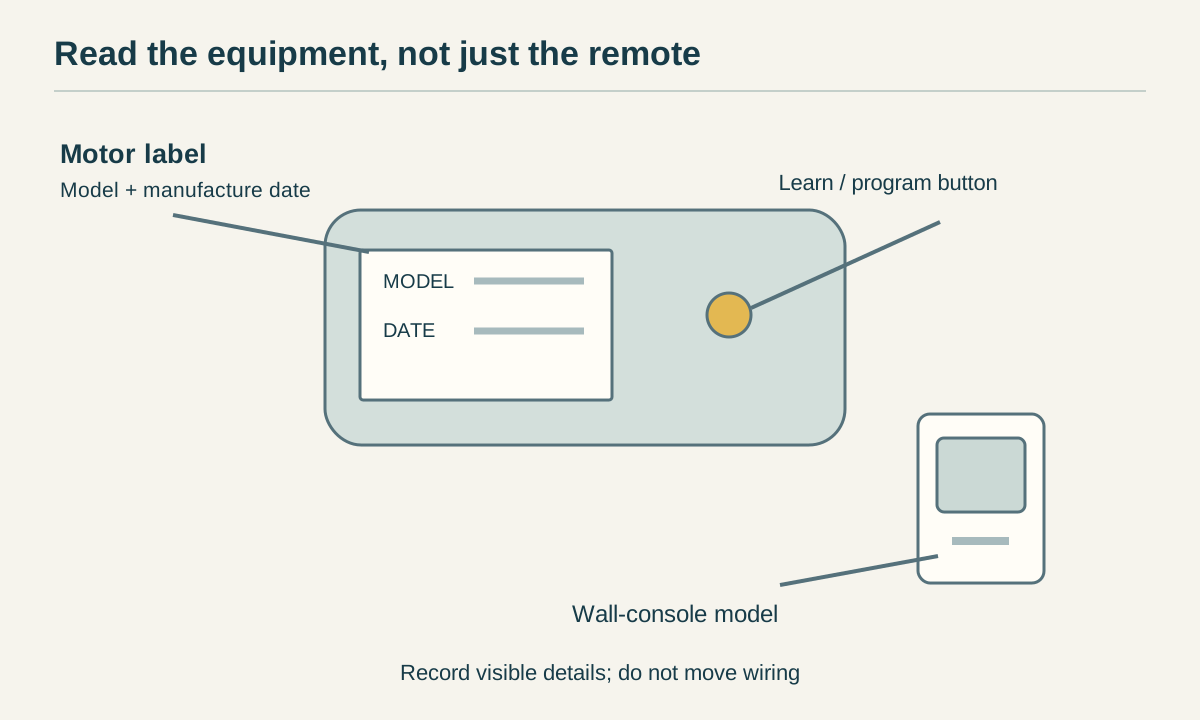
- Opener make and exact model. Read the motor unit's label, not just the name on a remote. Record its manufacture date if available.
- Control-system information. Note the learn/program button and its color, any protocol name, and the wall-console model. Photograph visible labels without opening a live electrical enclosure or moving wiring.
- Door type and safety equipment. Identify the door and confirm that the required safety sensors are present and functional.
- Controller model and accessories. Get the full product number, hardware version where relevant, and any required adapter or extra door sensor.
- Network and desired features. Check coverage at the intended mounting position, supported Wi-Fi band, app availability in your country and the particular smart-home integration you want.
Use that information in the controller manufacturer's current compatibility checker. If the result is unclear, request a model-specific answer from support before buying. Learn-button color is a useful clue within a manufacturer's product family, not a universal compatibility code.
 Open full diagram
Understand what the controller actually connects to
A wireless bridge
A supported bridge can send commands through the opener's radio system. Depending on the product, a separate sensor reports door position. This can avoid a wired connection to the opener's control terminals, but it still requires the correct radio protocol, compatible safety equipment and proper installation. Chamberlain Smart Garage Control is one example with its own brand, frequency and door-type restrictions.
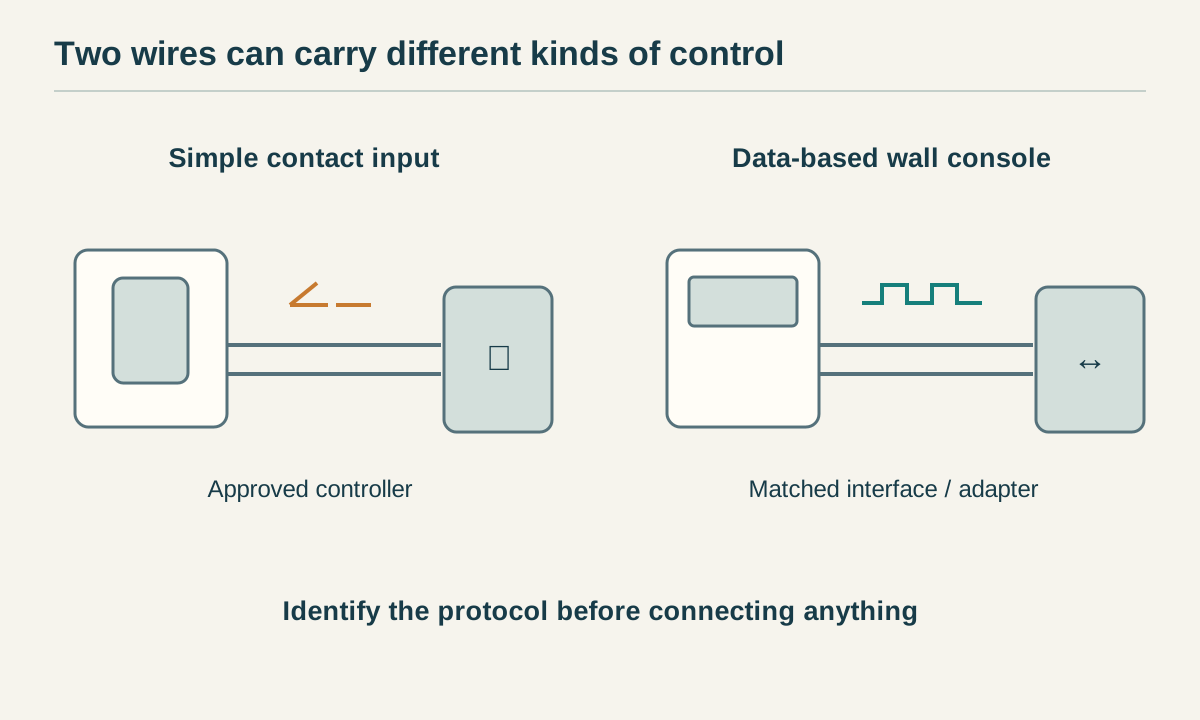
A wired controller or approved adapter
Some systems use an opener's supported low-voltage control input. Others need a manufacturer-approved adapter because the wall console exchanges electronic data rather than acting as a simple switch. Genie's compatibility guidance, for example, specifies adapter 38013R for Series III Genie and Overhead Door openers.
Two wires are not permission to bridge two terminals. Do not short unidentified terminals, connect a generic relay to safety-sensor wiring, or follow another opener's terminal colors. Wiring must match both the exact opener manual and the controller instructions. Where those instructions disagree or leave an interface unclear, stop and ask the manufacturers or a qualified installer.
An opener that already has connectivity
Check the existing opener's manual before adding hardware. It may already support its manufacturer's app, or need a specific supported accessory rather than a general retrofit kit. A logo alone does not establish that Wi-Fi is built in.
 Open full diagram
Current compatibility examples: where assumptions fail
These examples show why the product number matters. They are not a universal buying list.
- Chamberlain Smart Garage Control: the current support page distinguishes supported radio systems from monitor-only cases. It says DIP-switch openers cannot be operated by this controller, although door-status monitoring may be possible. Its Wayne Dalton support is limited to 372.5 MHz, not 303 MHz. Check the live list for your exact system.
- Genie Aladdin Connect: check the latest compatibility guide as well as the installation manual. Older compatibility charts still appear online, so a years-old exclusion or adapter recommendation should not settle a new purchase. Series III installations have a specific adapter requirement; pre-1993 and sensorless openers remain excluded in the current guide.
- Meross MSG150: Meross lists specific Chamberlain, LiftMaster and Craftsman Security+ 1.0/2.0 applications. Its FAQ excludes Security+ 3.0 with a white learn button and red/orange-button openers with three terminals. Do not transfer compatibility claims from MSG100 or MSG200 to MSG150, or vice versa.
Availability of an app does not establish compatibility with Apple Home, Alexa, Google Home or another platform. Verify the exact feature, controller variant, region, hub requirements and any subscription before purchasing. Do not buy on the promise of an unofficial integration remaining available.
Door-position sensing and safety sensing do different jobs
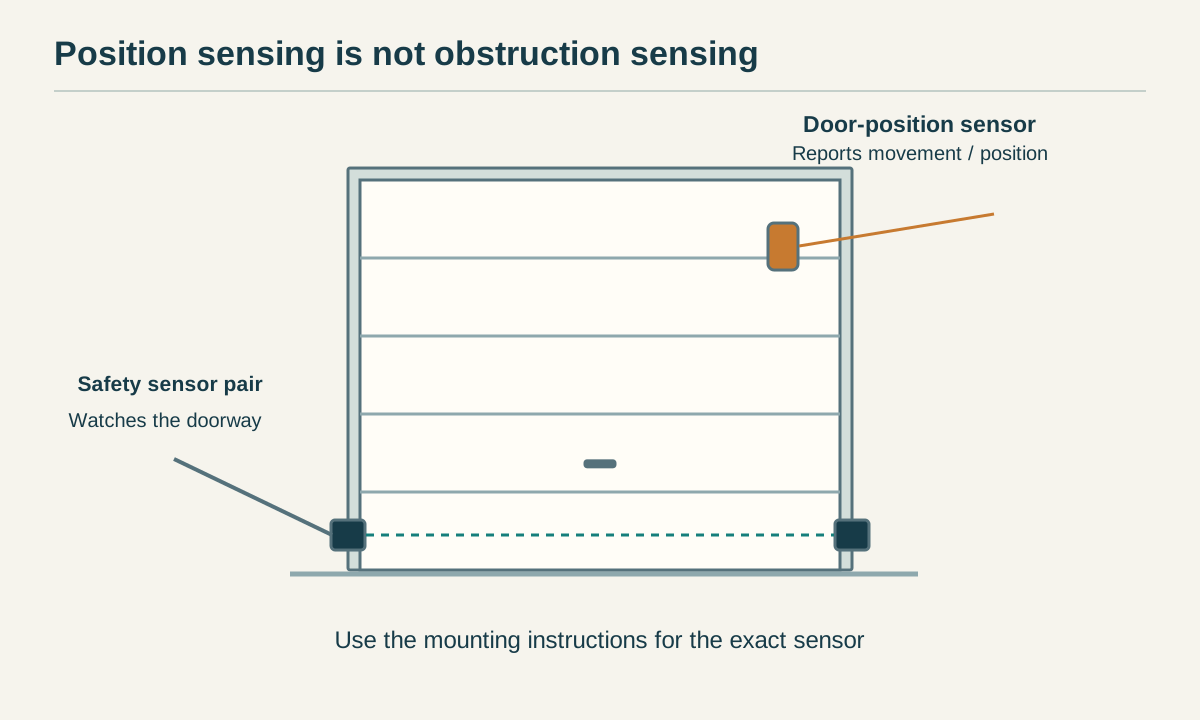
A position sensor tells the controller whether the door is open or closed. It may use tilt, a magnetic contact or information supplied by a supported opener. Photoelectric safety sensors watch the doorway for an obstruction. Adding the first does not replace the second.
Use only the mounting location, orientation and gap specified for the supplied position sensor. An app displaying “closed” is not a substitute for checking the door and testing the system. Loose mounting, a depleted sensor battery or a lost connection can make status unreliable.
 Open full diagram
What a safe installation and handover should include
Finish the compatibility check before installing anything. Follow the model-specific power-isolation instructions, including any battery-backup precautions, before wiring. Keep wiring and accessories away from moving hardware. Do not open mains-voltage compartments or improvise connections.
Place required audible and visual closing warnings where the controller's manual specifies. Do not hide a warning unit in a cabinet or disable it because the sound is inconvenient. Genie's instructions require its control module to be visible and audible from the open doorway.
With the doorway clear and the door in view, complete the manufacturer's commissioning and safety tests. Check existing controls, app commands, position updates and required warnings. Verify that each app entry operates the correct door in a multi-door garage. Stop if commands, status or reversal behavior do not agree with the manuals.
Plan for internet, power and account problems
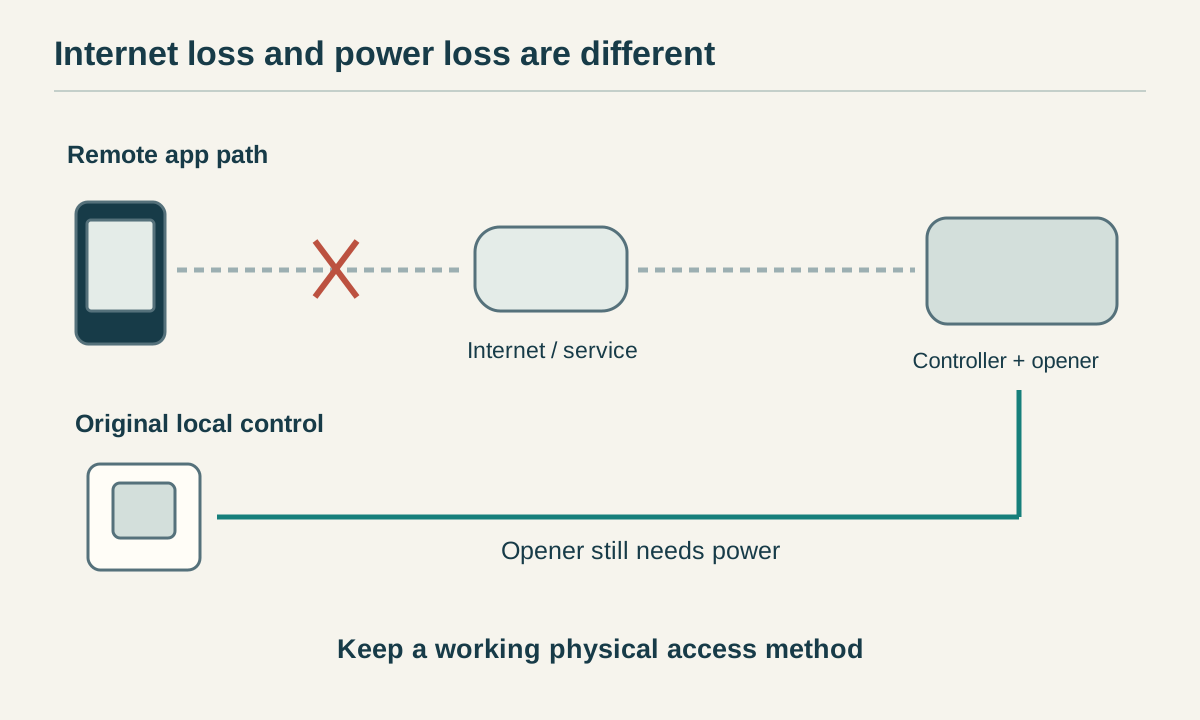
Remote access depends on more than the opener. The controller, home network, internet connection and any cloud service all need to work as the product requires. Loss of internet can interrupt app control or notifications while an otherwise functioning opener may still respond to its original local controls. A power failure is a different problem: phone control does not add motor power or battery backup.
Keep a working physical access method and learn the opener manual's emergency-release procedure before you need it. Never release a raised door with a suspected broken spring or other mechanical fault. If the garage is your only entrance, discuss emergency access with an installer.
Use an account you control, protect it with the service's available security features, and invite other users through supported access-sharing tools rather than sharing your password. Remove access when it is no longer needed. For a secondhand controller, confirm that the prior owner's association can be removed through the official process.
 Open full diagram
When replacement is the better purchase
Retrofitting makes sense when the door and opener are sound, the exact combination is supported, and the finished cost meets your needs. Include adapters, additional sensors, installation and network improvements when comparing prices.
Replacement deserves a quote if the opener lacks required safety equipment, has repeated operating faults, cannot be positively identified, or has no supported path to the features you need. A monitor-only sensor may answer “Did I leave it open?” without motor control, but it does not make an unsafe opener suitable for continued use.
The buying rule: match a safe, working opener to a specific supported controller. If either half of that statement is uncertain, resolve it before ordering.
Common questions
Can I make any old garage door opener smart?
No. Compatibility depends on the exact opener, controller, safety equipment and door type. Verify the current manufacturer guidance before buying.
Do two wall-button wires mean a smart relay will work?
No. Some wall consoles exchange data over two wires. Use only a supported controller or approved adapter for the exact opener.
Does a door-position sensor replace safety sensors?
No. A position sensor reports door state. Photoelectric safety sensors detect obstructions across the doorway and must remain functional.
Will a smart controller work during a power outage?
Adding phone control does not supply power to the motor. Operation during an outage depends on the opener’s supported backup power and the controller’s own requirements.
Should I retrofit or replace an older opener?
Retrofit a safe, reliable opener when an exact supported combination meets your needs. Consider replacement if required safety equipment is missing, faults recur or no supported path exists.
Related Posts
 DIY Guide
How Does the myQ App Work?
Learn how myQ connects your phone to a compatible garage door opener, what the sensor does, and how Wi-Fi, offline use and subscriptions differ.
 DIY Guide
How to Reset myQ: Reconnect First, Factory-Reset Only When Needed
Restore an existing myQ device after network changes, identify built-in Wi-Fi versus a hub, and avoid unnecessary ownership or accessory resets.
Sources
Manufacturer instructions and references for this guide. Match the document to your exact product.
- Chamberlain: Smart Garage Control compatibilitysupport.chamberlaingroup.com
- Genie: current Aladdin Connect compatibility guidewww.geniecompany.com
- Genie: Aladdin Connect installation instructionsstore.geniecompany.com
- Meross: MSG150 compatibility and exceptionswww.meross.com