How Does the myQ App Work?
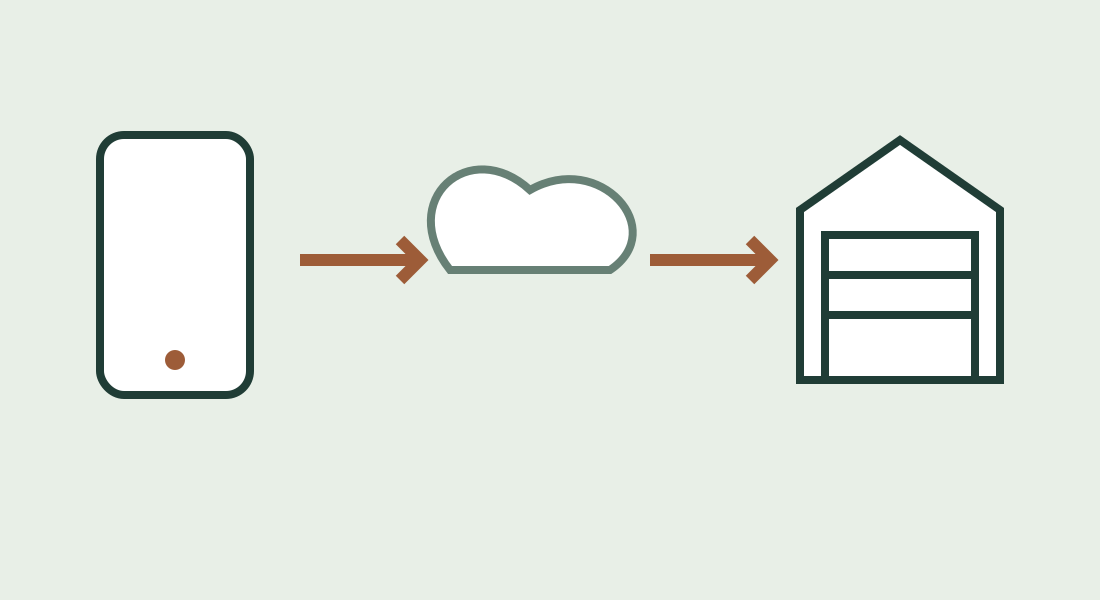
The myQ app lets you check and operate a compatible garage door through an internet connection. Your phone sends a request through myQ’s online service to equipment at home. The opener moves the door, and the system reports its position back to the app. Downloading the app alone does not make an ordinary opener internet-connected. myQ compatibility overview.
Understanding that round trip helps answer three practical questions: what hardware you need, why a remote can work when the app does not, and how to know whether a close request actually finished.
From your phone to the garage
For the common residential Wi-Fi setups covered here, think of the route as:
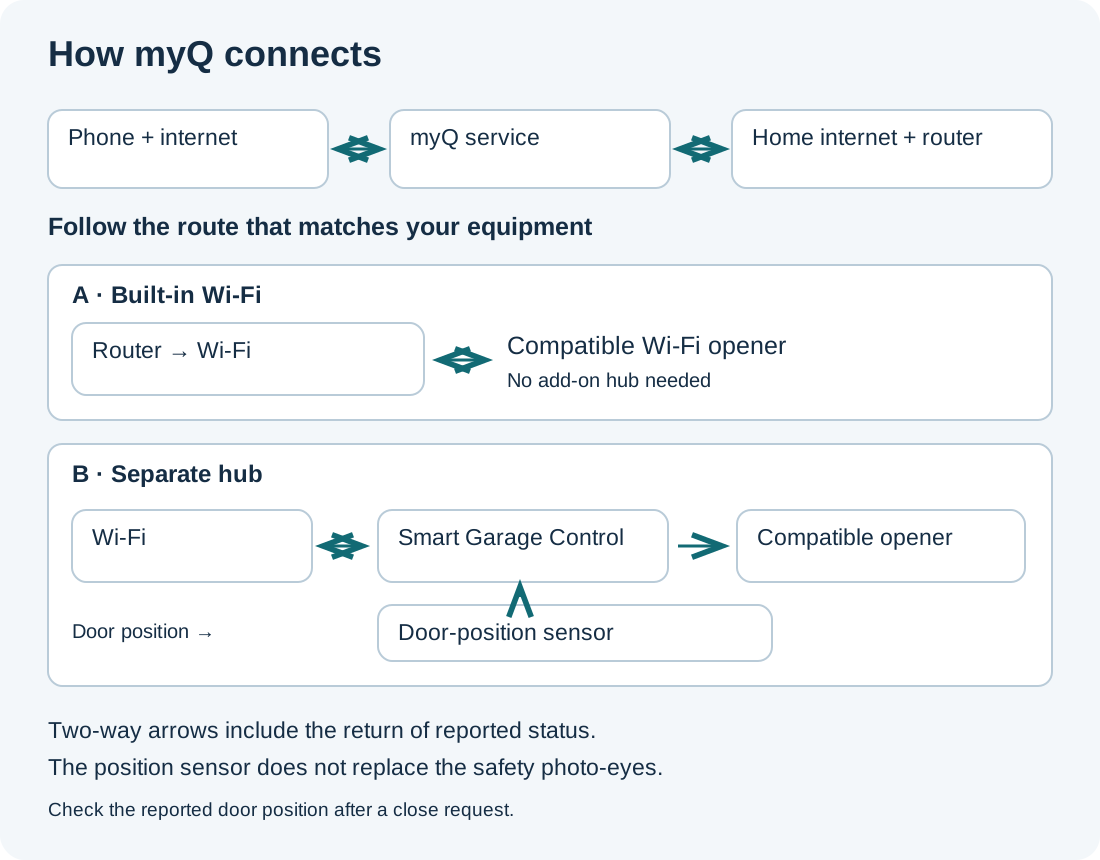
Phone with internet → myQ service → home internet/router → Wi-Fi opener or separate hub → door operation.
Door status travels back toward the phone. This is a simplified explanation of the connections, not a guarantee that every command will arrive or complete. Chamberlain’s troubleshooting guidance distinguishes an internet connection problem from a hub-to-opener or sensor problem. App control troubleshooting.

The separate sensor shown belongs to the add-on hub setup. The photo-eye safety sensors have a different job.
Built-in Wi-Fi opener
A compatible opener with built-in Wi-Fi connects to the home network itself. You do not add a Smart Garage Control just because you want phone control. Confirm the model’s capabilities in its manual; a myQ marking by itself is not a reason to buy a particular accessory. Identify built-in Wi-Fi equipment.
Smart Garage Control or an older hub
A separate hub adds connectivity to a compatible existing opener. In this arrangement, the hub connects to Wi-Fi, pairs with the opener and receives position information from a sensor attached to the door. Older myQ Garage and Smart Garage Hub models have their own instructions. Hub setup overview.
An Ethernet Internet Gateway is another hardware route. If that is what you have, use the equipment-identification and setup guide rather than applying the Wi-Fi-hub diagram literally.
Status, command and confirmation are different
Imagine you check the app after leaving home:
- Status: “Open” is the door position reported to the system.
- Command: Tapping close requests an action.
- Confirmation: An updated closed state indicates that the system reports the door as closed.
Treat those as separate checkpoints. A tap is not proof of closure. If the status fails to update, an error appears or the result is uncertain, have someone authorized check the door rather than repeatedly sending commands.
With an add-on hub, a weak sensor battery or interrupted sensor communication can cause incorrect status or prevent app operation. This door-position sensor does not replace the safety sensors near the floor. Door-sensor troubleshooting.
The distinction also matters during setup: some configurations can report position without being able to operate the opener. Check the exact opener against the compatibility list, including door requirements and exceptions, rather than relying only on its brand or age. Smart Garage Control compatibility.
Why the handheld remote may still work
Your programmed handheld remote uses a local connection to the opener; it does not need the app’s internet route. A working remote therefore does not prove that the garage’s Wi-Fi connection is healthy.
During a myQ service or connection outage, an existing remote, wall control or keypad may still operate the door if the opener has power and the equipment is working normally. Keep an authorized backup entry method available. A power outage is a separate problem from an app outage. Chamberlain’s outage alternatives.
Your phone can use Wi-Fi or mobile data to reach the internet. Switching the phone to cellular does not restore an offline garage connection. Start by checking which end is disconnected: the phone/app or the garage device. App connection checks.
What setup involves
Before starting, identify the opener and any separate controller by model number. Choose the consumer app for compatible personal garage equipment; property-managed access follows a different route. Our myQ app-choice guide explains that distinction.
Follow the model-specific setup, then compare the displayed state with the door and perform a safe, observed test. Bluetooth used during Smart Garage Control setup is not an offline substitute for internet-based app control. Official hub setup.
For button sequences and troubleshooting, continue to the setup guide. Avoid resetting an otherwise working opener just to learn how the app works.
Is a subscription required?
Basic opening, closing and monitoring are offered through the free consumer myQ app with compatible connected equipment. Camera recording is a separate service, not a requirement to turn a compatible opener into an app-controlled door. myQ app features.
myQ says video recording requires a Video Monitoring plan. Camera features and paid enhancements vary by device and plan, so check the current terms rather than assuming every camera function is included. Video Monitoring plans.
Vehicle integrations can have separate subscriptions and compatibility requirements. Do not infer support for a car, voice assistant or smart-home platform simply because the door works in the phone app. Example: myQ Connected Garage for Tesla.
Safe everyday use
Keep people, pets and objects clear of the door. Never bypass safety sensors to make an app command work. Obstructed or misaligned photo-eyes can prevent closing or cause reversal. Opener diagnostic guidance.
Some openers also require a paired warning light for unattended operation. Check the model instructions if local controls work but app closing does not. Remote-light requirement.
Quick questions
Can I use myQ away from home?
Yes, with supported equipment and working internet connections. Being away is not the obstacle; a broken connection or an opener problem can be.
Does the app physically move the door?
The opener does. The app provides the interface for requesting operation and checking reported status.
Do I need a camera?
No camera is needed for the basic opener-control arrangements described here. A door-status indicator is not a video view of the garage.
What should I check first if something fails?
Identify the symptom: app will not load, device shows offline, status looks wrong, or the door will not move. Record the exact message and model before choosing a troubleshooting procedure.
Sources & manuals
- myQ compatibility overview
- App control troubleshooting
- Identify built-in Wi-Fi equipment
- Hub setup overview
- equipment-identification and setup guide
- Door-sensor troubleshooting
- Smart Garage Control compatibility
- Chamberlain’s outage alternatives
- App connection checks
- myQ app-choice guide
- Official hub setup
- setup guide
- myQ app features
- Video Monitoring plans
- Example: myQ Connected Garage for Tesla
- Opener diagnostic guidance
- Remote-light requirement