How to Program a Chamberlain Garage Door Opener Remote
Quick answer
Programming a Chamberlain remote means matching the transmitter to the opener, preparing the remote if its model requires it, and completing the opener's learning step. The remote model matters as much as the opener brand. A sequence written for a 953EV is not a universal instruction for every Chamberlain transmitter.
We recommend checking compatibility before touching LEARN. It takes less time than recovering from an unnecessary memory erase, and it catches unsupported accessories before they become a troubleshooting project.
What you need
Have the opener model, the complete remote model including suffixes, a fresh correct battery if battery condition is uncertain, and the accessory's instructions. A flashlight helps with labels; a stable stepladder may be needed for safely accessible controls. Do not remove a mains-electrical cover to identify programming buttons.
Plan around 15–30 minutes for the complete job. Most of that allowance is for identification and verification. A short learning window inside the procedure is not the total job time.
Start only with an authorized installation and a door that operates normally. Keep people, animals, tools, and vehicles out of its path. Make sure nobody else is pressing another controller while you work.
1Identify which type of programming you need
A handheld remote sends a radio command directly to the opener or a compatible receiver. A wireless keypad combines a PIN with its own transmitter. A myQ setup process concerns connected features and may involve the network or an account.
If only phone control failed after a router change, use the myQ reconnection guide rather than adding the handheld remote again. If the door itself struggles or reverses, diagnose the movement problem first.
2Read the exact compatibility entry
Check the remote model against Chamberlain's current compatibility information. Record the opener's LEARN-button color where the instructions ask for it, but do not make color your only identifier.
As an example, Chamberlain lists the older 953D for the purple-button generation, whereas several EV accessories span multiple older generations. Similar branding does not make those transmitters equivalent. Newer white-button equipment requires its own supported instructions; do not extend an older color table beyond the models it covers.
If you have an external receiver, identify that too. The device receiving the radio command can determine the procedure even when another brand is printed on the main opener housing.
3Understand remote preparation versus opener learning
Some remotes must first be configured for the opener family. That stage happens on the handheld transmitter. The later stage makes the opener accept the chosen button. Completing the first stage does not establish that the door has learned anything yet.
Worked example: 953EVMC with a listed older opener generation
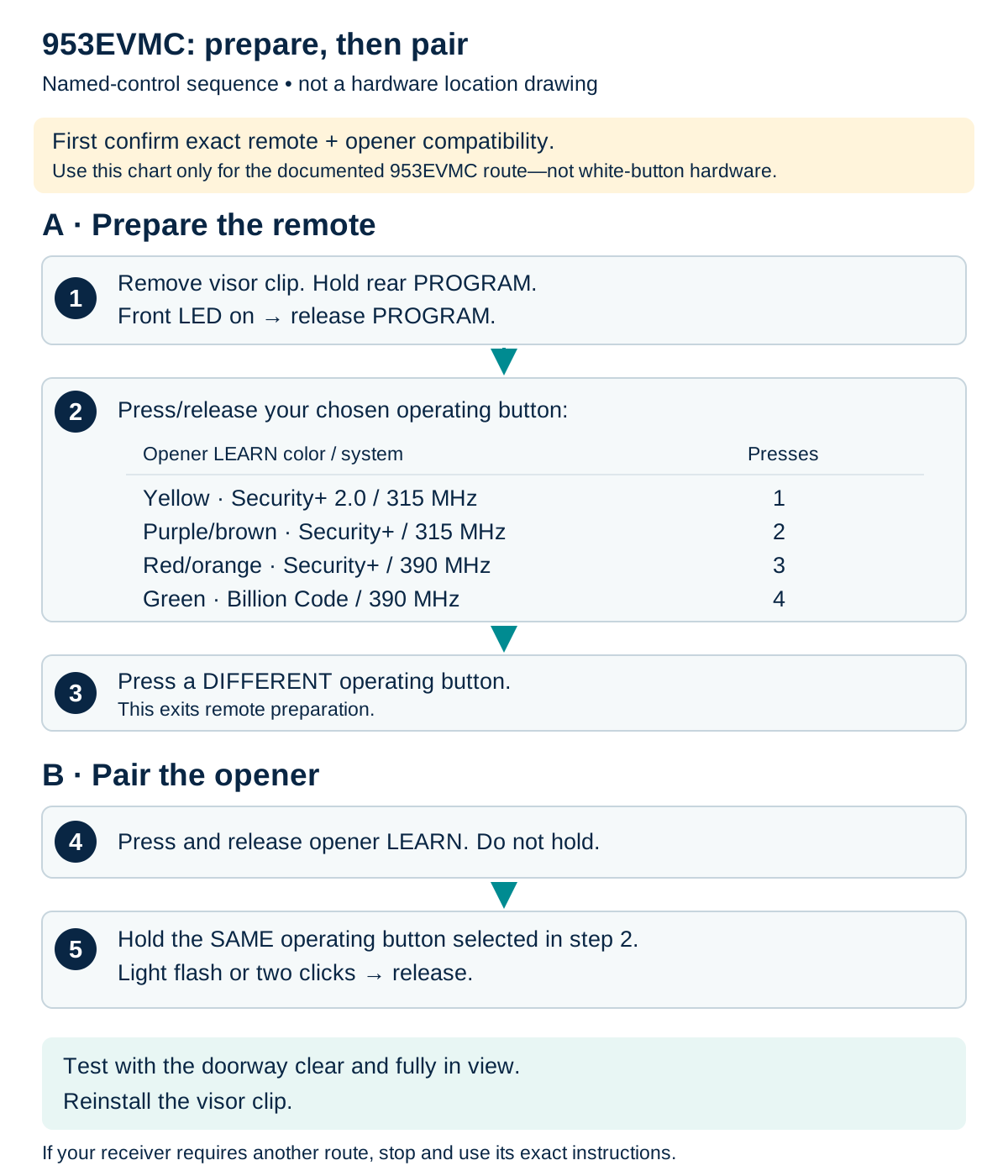
953EVMC: prepare the remote, then pair the receiver
Use this example only for a 953EVMC and a receiver generation explicitly listed by its instructions. Do not extend these counts to white-button hardware or a differently named remote.
Scroll sideways for detail, or open the full-size diagram. The complete instructions are written below.
Open full-size diagram and zoom (new tab)
- Confirm exact remote and receiver compatibility. The chart is only for the documented 953EVMC route; do not extrapolate it to white-button hardware.
- Remove the visor clip. Hold rear PROGRAM until the front LED turns on, then release PROGRAM.
- Press/release the chosen operating button: yellow Security+ 2.0/315 MHz once; purple/brown Security+/315 MHz twice; red/orange Security+/390 MHz three times; green Billion Code/390 MHz four times.
- Press a DIFFERENT operating button to exit remote preparation.
- Press/release the compatible opener LEARN button. Hold the SAME operating button selected earlier until a light flash or two clicks, then release.
- Test with the doorway clear and in view; reinstall the clip. If your receiver uses another procedure, follow its exact guide.
Manufacturer instructions
Use this complete sequence only for a 953EVMC paired to a generation expressly covered by its chart:
- Hold the remote's rear program control until its front LED illuminates.
- Press the chosen operating button once for yellow, twice for purple/brown, three times for red/orange, or four times for green.
- Press a different remote button to exit preparation.
- Briefly press and release the opener's LEARN control.
- Hold the prepared remote button until the opener flashes or clicks twice.
- Test the assigned button with the door visible.
Do not extend this chart to a white-button opener or substitute another remote model. Confirm the published compatibility match before using the example.
Separate example: 953EV-P2 remote with an original B970 opener
This example uses the visor-style 953EV-P2 remote in manual 114A5043C and the original B970 Security+ 2.0 receiver in manual 114A5036. It is not the 953EVMC example. Verify the exact remote label, matching front and rear controls, original receiver and yellow LEARN control before proceeding; stop if a replacement board or different model makes the match uncertain.
The B970 manual lists the 953EV accessory family; the remote manual groups 953EV and 953EV-P2 and supplies the yellow Security+ 2.0 route. Use that documented combination only, not a suffix-based assumption about newer MC equipment. Use a mechanically sound door with working safety sensors and a working opener lamp. Keep its entire path clear and visible, use safe access to the controls and keep people out of the doorway throughout pairing and testing.
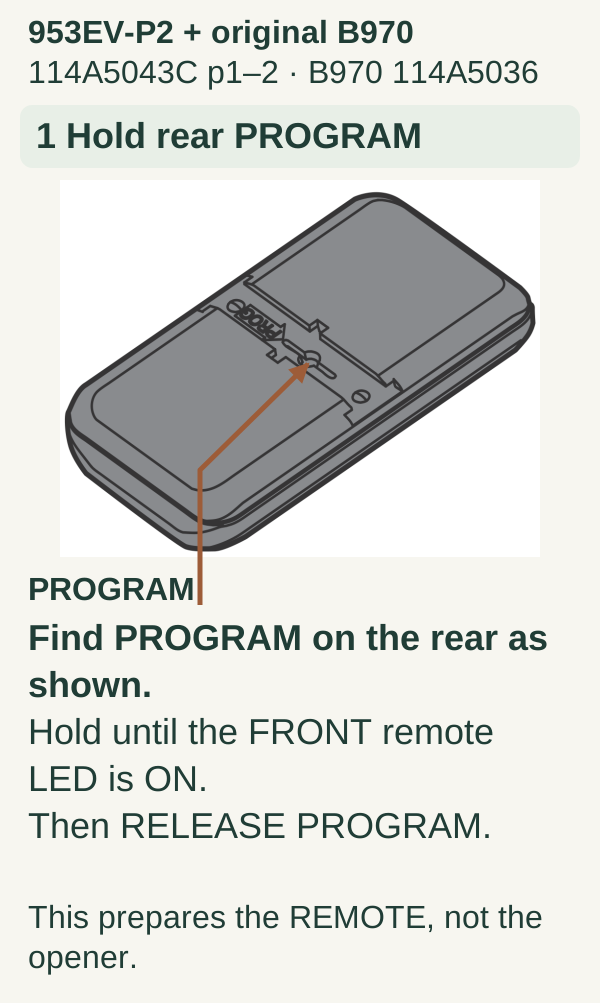
- Prepare the remote from its rear PROGRAM control. Hold PROGRAM until the front remote LED turns on, then release. The LED is an observation point, not an operating button. Use the visor-style remote drawing, not a keychain remote’s layout.
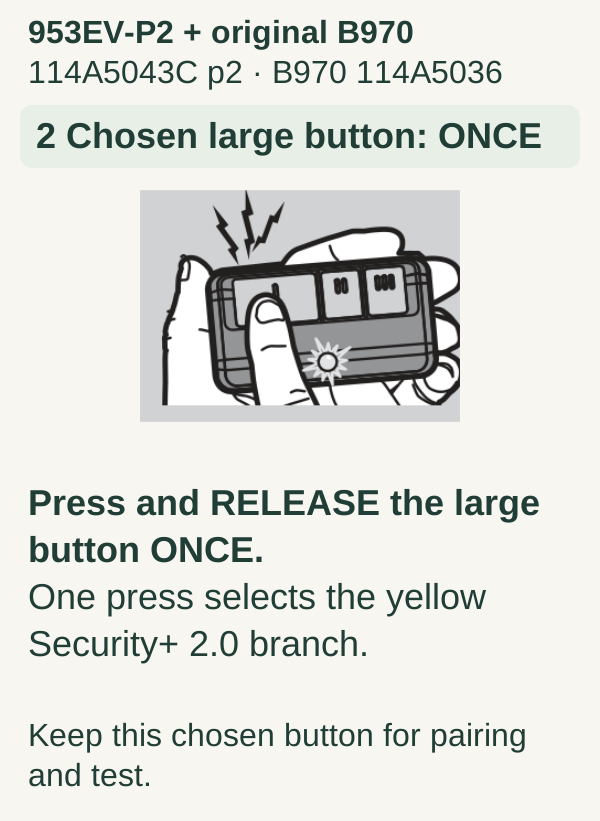
- Select one operating button. Press and release the front button you want to use once for this yellow Security+ 2.0 example. Remember which button you selected; one press is not a universal setting for every opener generation.
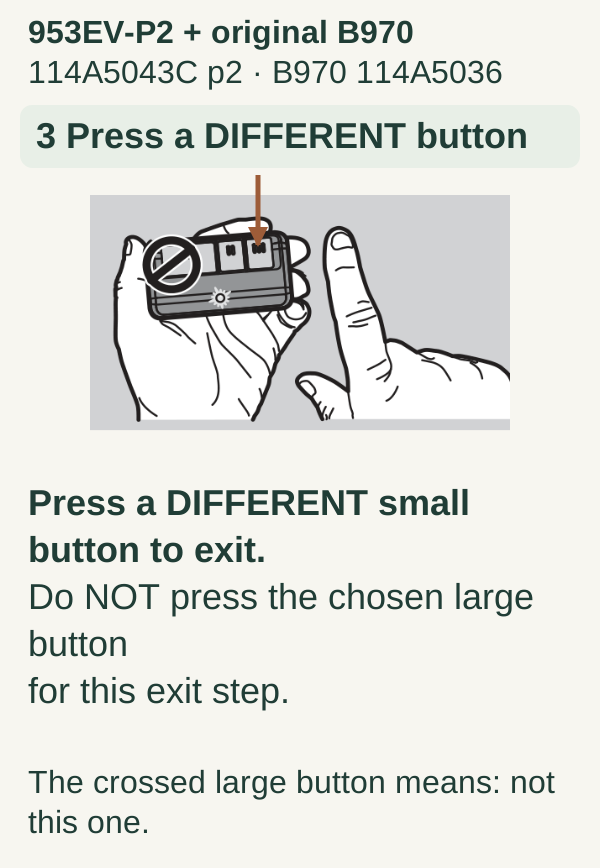
- Exit remote preparation with a different button. Press a different operating button on the remote. Do not substitute the selected button for this exit step.
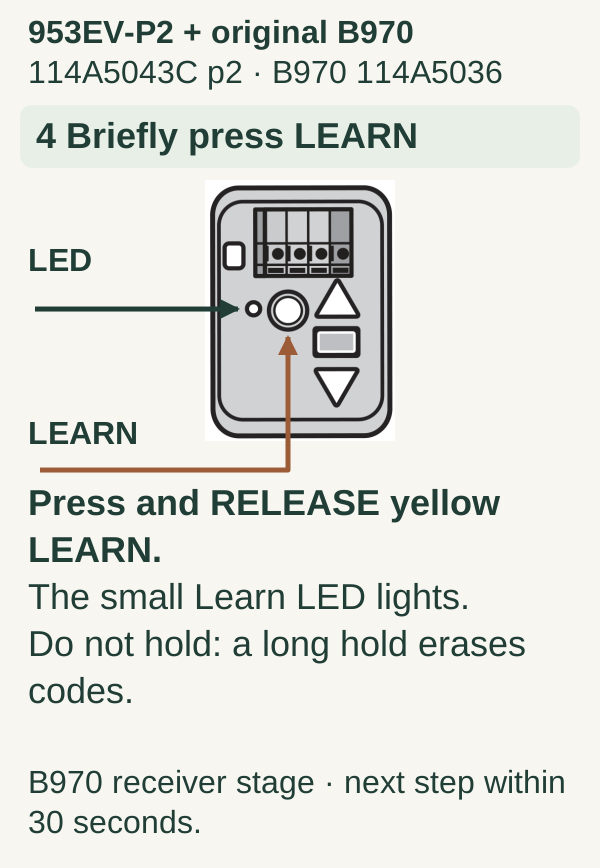
- Briefly tap the opener’s round yellow LEARN button. Press and release it once; the Learn indicator lights. Do not hold LEARN: holding it until its indicator goes out, about six seconds on this receiver, erases remote and keypad memory. Do not use the black adjustment control or the three-tap Wi-Fi sequence.
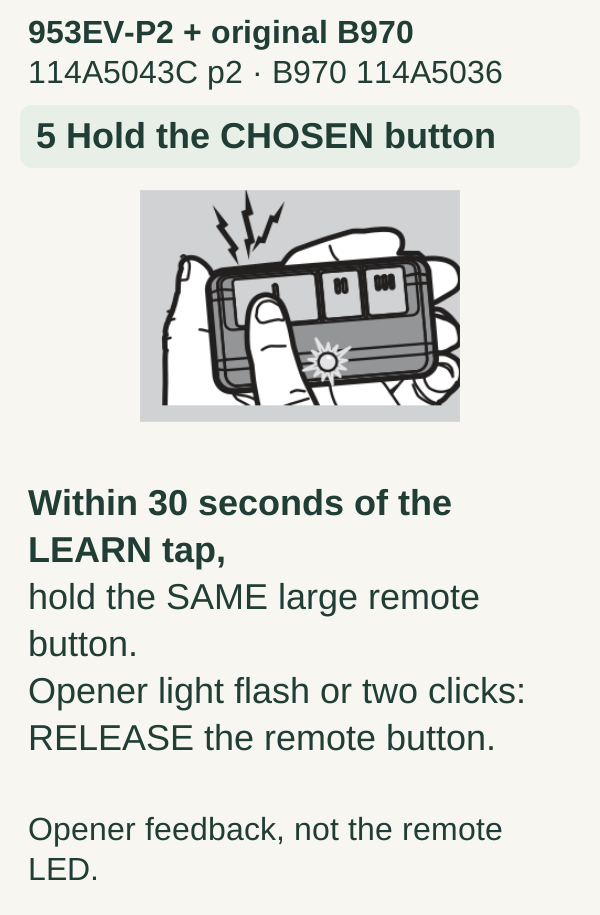
- Send the selected remote button within 30 seconds. Press the button selected in step 2 until the opener lights flash or two clicks are heard, then release. Use the lamp-flash or click response rather than a timed hold. Do not change to the different button used to exit preparation.
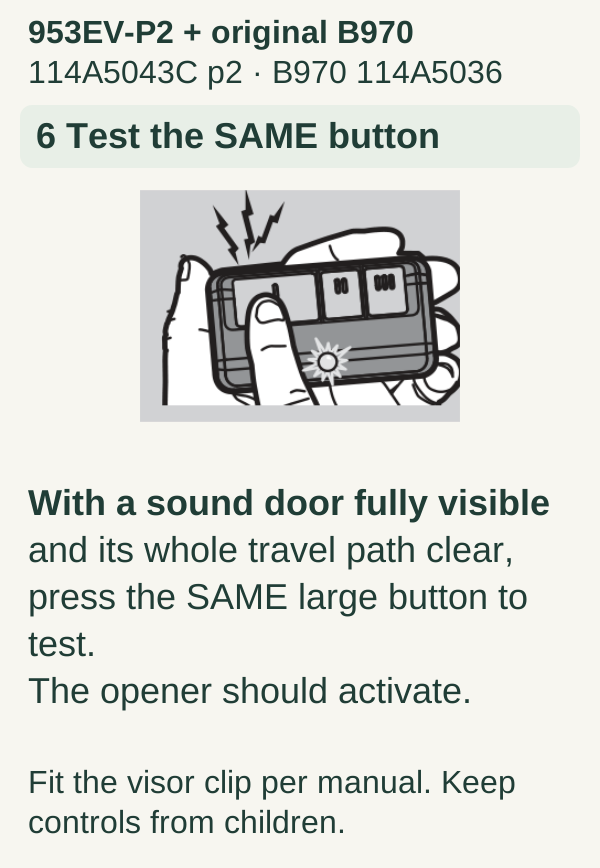
- Verify actual operation safely. With the door’s full path clear and in view, press the programmed button to test. If it does not operate the intended door, stop and recheck the exact manuals and observed responses rather than clearing all memory. Verify that other intended controls still work.
References: 953EV-P2 / 953EV remote manual, 114A5043C, and the B970 owner’s manual, 114A5036, including its accessory list.
Legacy 953EV-P2 + original B970: separate named example
- Exact 953EV-P2 remote and original B970 114A5036 Security+2.0 configuration only. Not 953EVMC, white LEARN, a replacement board or any other model.
- Read the full model-specific procedure first; sound properly adjusted door with working lamp and safety sensors, full path visible and clear, safe stable access.
- Receiver LEARN is one brief press/release. A long hold until the LED goes off, approximately 6 seconds, erases radio access.
- The large operating button is chosen for this example; exit uses a DIFFERENT small button, not the chosen large button.
Scroll within the image if needed, or open the full-size view. The key details are also written below.
953EV-P2 + original B970 114A5043C p1–2 · B970 114A5036 1 Hold rear PROGRAM PROGRAM Find PROGRAM on the rear as shown. Hold until the FRONT remote LED is ON. Then RELEASE PROGRAM. This prepares the REMOTE, not the opener.
Scroll within the image if needed, or open the full-size view. The key details are also written below.
953EV-P2 + original B970 114A5043C p2 · B970 114A5036 2 Chosen large button: ONCE Press and RELEASE the large button ONCE. One press selects the yellow Security+ 2.0 branch. Keep this chosen button for pairing and test.
Scroll within the image if needed, or open the full-size view. The key details are also written below.
953EV-P2 + original B970 114A5043C p2 · B970 114A5036 3 Press a DIFFERENT button Press a DIFFERENT small button to exit. Do NOT press the chosen large button for this exit step. The crossed large button means: not this one.
Scroll within the image if needed, or open the full-size view. The key details are also written below.
953EV-P2 + original B970 114A5043C p2 · B970 114A5036 4 Briefly press LEARN LEARN LED Press and RELEASE yellow LEARN. The small Learn LED lights. Do not hold: a long hold erases codes. B970 receiver stage · next step within 30 seconds.
Scroll within the image if needed, or open the full-size view. The key details are also written below.
953EV-P2 + original B970 114A5043C p2 · B970 114A5036 5 Hold the CHOSEN button Within 30 seconds of the LEARN tap, hold the SAME large remote button. Opener light flash or two clicks: RELEASE the remote button. Opener feedback, not the remote LED.
Scroll within the image if needed, or open the full-size view. The key details are also written below.
953EV-P2 + original B970 114A5043C p2 · B970 114A5036 6 Test the SAME button With a sound door fully visible and its whole travel path clear, press the SAME large button to test. The opener should activate. Fit the visor clip per manual. Keep controls from children.
4Complete one controlled pairing attempt
Read the matching instructions all the way through. Locate the required control and the expected completion signal before starting. Prepare the remote if required, enter the opener's learning state exactly as directed, and send the designated button command within that model's stated window.
Watch the opener's confirmation. Do not interpret every remote flash or opener beep as successful pairing. If nothing confirms, allow the attempt to end and review the preceding step. Pressing buttons faster, holding them longer, or trying a different color chart can make the result harder to diagnose.
If the door begins moving: remain clear and keep it in sight. Movement during setup is possible, which is why the test area must be prepared beforehand.
5Verify the new and existing controls
After the learning state ends, operate the new button from a safe viewing position. Confirm which door moves. Then try an existing control that should still be authorized.
For a multi-door garage, test one door at a time. We recommend marking unused remote buttons in your private notes instead of assigning them accidentally during a hurried sequence. Keep the remote out of children's reach when finished.
A useful completion record contains the opener model, transmitter model, assigned button, and date. It should not contain a publicly visible PIN, Wi-Fi password, or account recovery information.
Troubleshooting and common mistakes
- No transmitter light: inspect the shipping tab, battery type, and polarity before retrying setup.
- Good transmitter light, no pairing: verify model compatibility and whether the remote-preparation stage was completed.
- Only works close to the opener: investigate battery performance, vehicle shielding, and interference; pairing again is not the first remedy.
- Wall control works but all remotes fail: check the wall control's documented lock feature before deleting memory.
- Opens but refuses to close: treat this as a closing problem, including safety-sensor checks, not a reason to increase force.
FAQ
Should I hold LEARN until the light goes out? Not as a generic pairing instruction. Longer holds can perform memory functions. Follow the exact procedure's press-and-release or hold instruction.
Can I program without internet? Traditional remote pairing and connected-app setup are separate routes. Consult your device's instructions for the available local pairing method.
Should I factory-reset after a failed attempt? We recommend checking the model match and sequence first. A full reset can create several new setup tasks without resolving incompatibility.
Key takeaways
Use one model-matched procedure from start to finish. Distinguish transmitter preparation from receiver pairing, confirm the intended door responds, and preserve existing access unless you deliberately mean to revoke it.
Explore guides · About this guide
Was this guide useful?
Your choice stays in this browser only. It is not sent to us.
Sources & manuals3
Manufacturer instructions and references for this guide. Match the document to your exact product.
- Manufacturer instructionssupport.chamberlaingroup.com
- 953EV-P2 / 953EV remote manual, 114A5043Cembed.widencdn.net
- B970 owner’s manual, 114A5036images.orgill.com