How to Program a LiftMaster Garage Door Opener Remote
Quick answer
To program a LiftMaster remote, identify both the opener and the transmitter, confirm their compatibility, and use the pairing control specified for that opener. Do not assume LEARN is always on the motor unit. The original LiftMaster 8500, for example, pairs remote controls through its compatible myQ wall control.
We recommend treating the remote's complete model number as essential. An 893LM and an 893MAX may look like straightforward three-button remotes, but their programming routes are not interchangeable.
Before you start
Gather the opener model, remote model, wall-control model if relevant, working remote battery, and the correct instructions. Photograph the labels while you can read them clearly. Keep any PIN or account information out of photos you share publicly.
Allow about 15–25 minutes if the manuals are available. Allow longer if you need to identify a replacement receiver or older wall panel. The time estimate includes a careful test, not just pressing the programming buttons.
Only manage access for a garage you are authorized to control. Clear the doorway and keep the door visible. If it hangs unevenly, has a loose cable, or makes a sudden grinding sound, stop: programming should wait until the door is safe to operate.
1Match the hardware, not just the logo
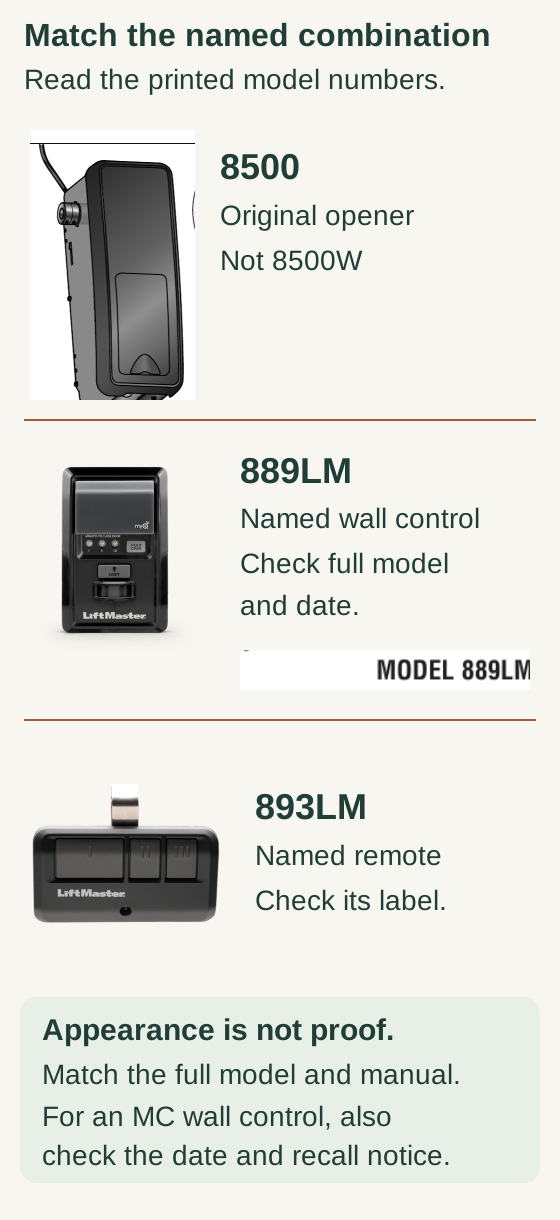
Scroll within the image if needed, or open the full-size view. The key details are also written below.
This named combination is the original 8500 opener, not the 8500W, with an 889LM wall control and an 893LM remote. Read the full printed models on your own hardware, including the wall-control suffix and manufacture date.
Appearance is not proof of the exact model or recall status. The wall-control front photograph and manual-title detail do not certify the pictured unit’s suffix or manufacture date. Check the applicable recall notice before following the named example.
Find the opener's full model on its label and the remote's model on its own case. Check LiftMaster's compatibility listing for that combination and the applicable LEARN-button generation.
Do not infer compatibility from the number of buttons. Likewise, do not use an older yellow-button chart to make claims about a newer white-button model. The correct accessory manual is the deciding reference, especially if a suffix differs from the example you found.
2Find the correct programming location
For many ceiling-mounted units, the relevant controls are accessible near the antenna or behind a light cover. Other installations use a wall-control programming menu or a receiver with its own instructions.
The original 8500 with an 888LM or 889LM control panel is an important exception: its remote-learning function is at the wall panel. The button on that opener is associated with travel and force setup, so choosing it merely because it says LEARN sends you down the wrong route.
Check the model carefully. “8500” does not automatically mean every product whose name starts with those four digits.
3Use the correct example only if your models match
Example: original 8500 with 888LM/889LM and 891LM or 893LM
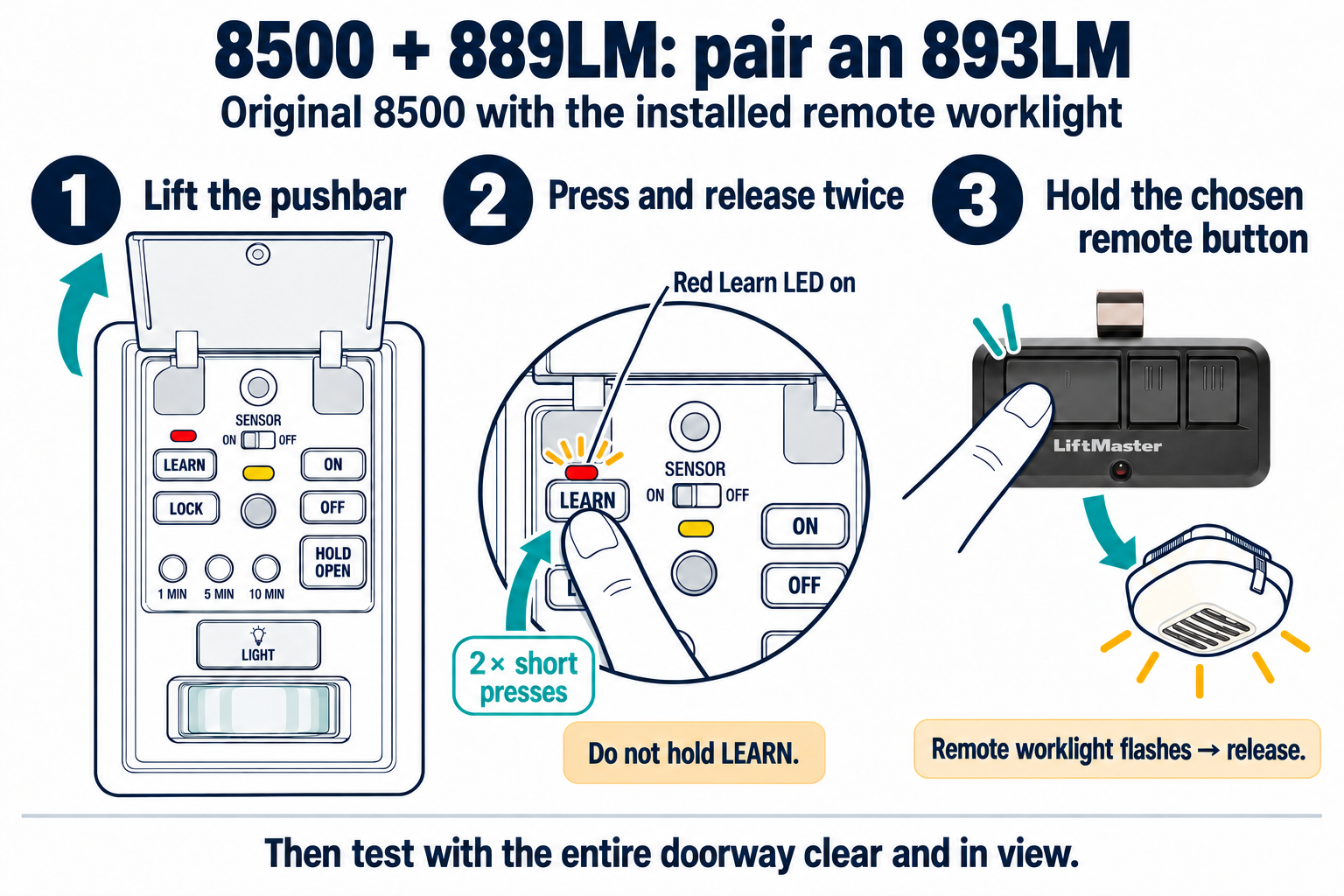
Original 8500 + 889LM + 893LM: pairing sequence
Use this sequence only for an original 8500 with an 889LM and 893LM. The light confirmation below requires the installed remote worklight. Keep the doorway clear and fully visible; do not use motor travel or force controls for pairing.
Scroll sideways for detail, or open the full-size diagram. The complete instructions are written below.
Open full-size diagram and zoom (new tab)
- Lift the 889LM pushbar to expose its LEARN button.
- Press and release LEARN twice. The red Learn indicator turns on. Do not hold LEARN.
- Press and hold the chosen 893LM operating button until the installed remote worklight flashes, then release it.
- After programming ends, test that button with the entire doorway clear and in view. Check a previously working control as well.
LiftMaster 8500 pairing instructions · 889LM manual
With the doorway clear, lift the wall panel's push bar to access its LEARN control. Press and release that control twice; use the indicator response specified by the matching panel manual. The manufacturer’s original-8500 example describes the red LED turning on; other panel instructions may describe blinking. Press the remote button assigned to the door. Then test that button from a safe position with the door visible.
If the panel, indicators, or model numbers do not match this description, stop and use that installation's instructions. Do not move the same sequence to the motor unit.
Original 8500 + 889LM + 893LM: two pairing actions enlarged
- Use only the original LiftMaster 8500 with an identified 889LM panel and compatible 893LM remote. This is not the 8500W route or permission to extend recall guidance to an unidentified MC model.
- Confirm the complete model, manufacture date and applicable recall guidance before programming. Use a sound door with its full travel path clear and visible, and complete the safe access test after pairing.
- The installed remote worklight must function. Flip up the panel push bar to expose controls as described in the full procedure; do not open wiring or remove the panel.
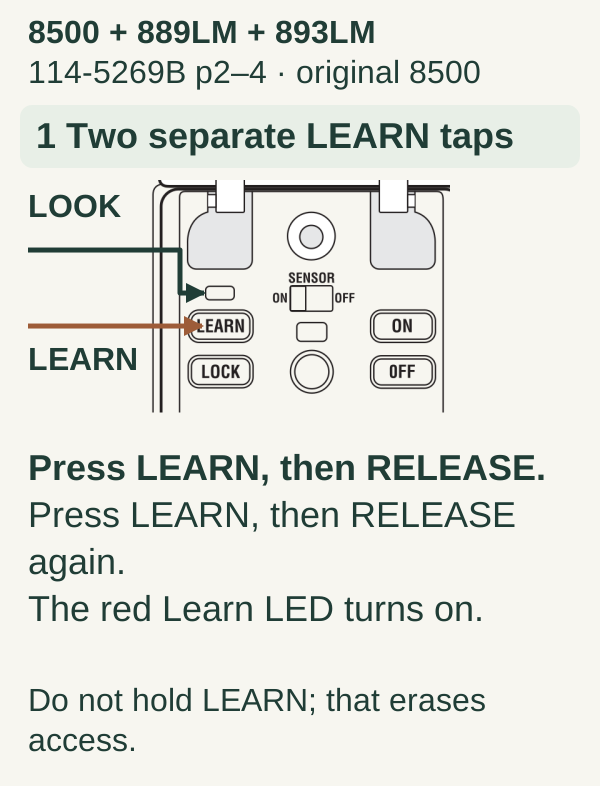
Scroll within the image if needed, or open the full-size view. The key details are also written below.
For the original 8500 with the identified 889LM panel, press and release the panel LEARN button, then press and release it again. The red Learn LED turns on. These are two separate taps; do not hold LEARN because that erases access.
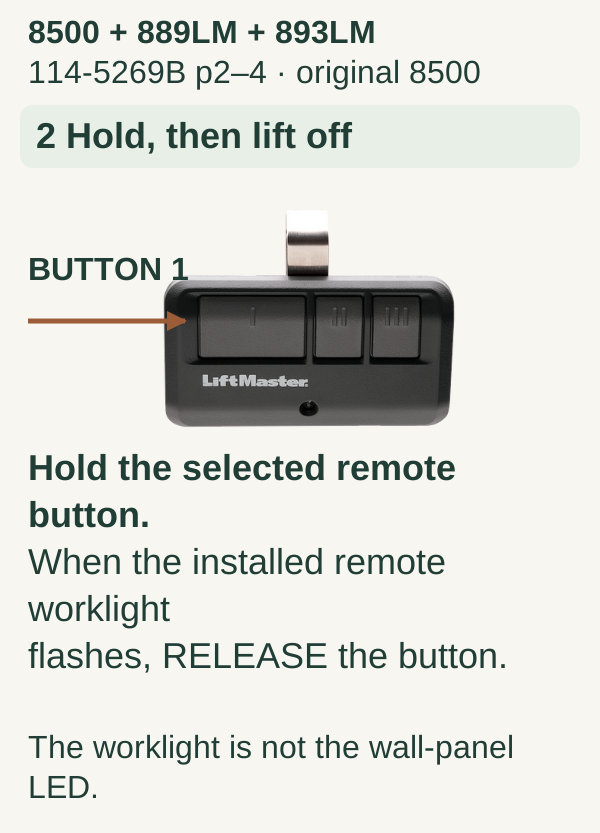
Scroll within the image if needed, or open the full-size view. The key details are also written below.
Hold the selected compatible 893LM remote button. When the installed remote worklight flashes, release the remote button. The worklight is not the wall-panel Learn LED. Complete the safe access test in the next section; the static frame is not proof of success.
Other LiftMaster combinations
MAX-family accessories may need a remote-side setup stage before opener pairing. Newer accessories and wall panels can use another route. Open the manual for your precise remote, identify its preparation stage, then follow the corresponding opener-learning stage without mixing steps from different guides.
4Test access before putting the ladder away
Scroll within the image if needed, or open the full-size view. The key details are also written below.
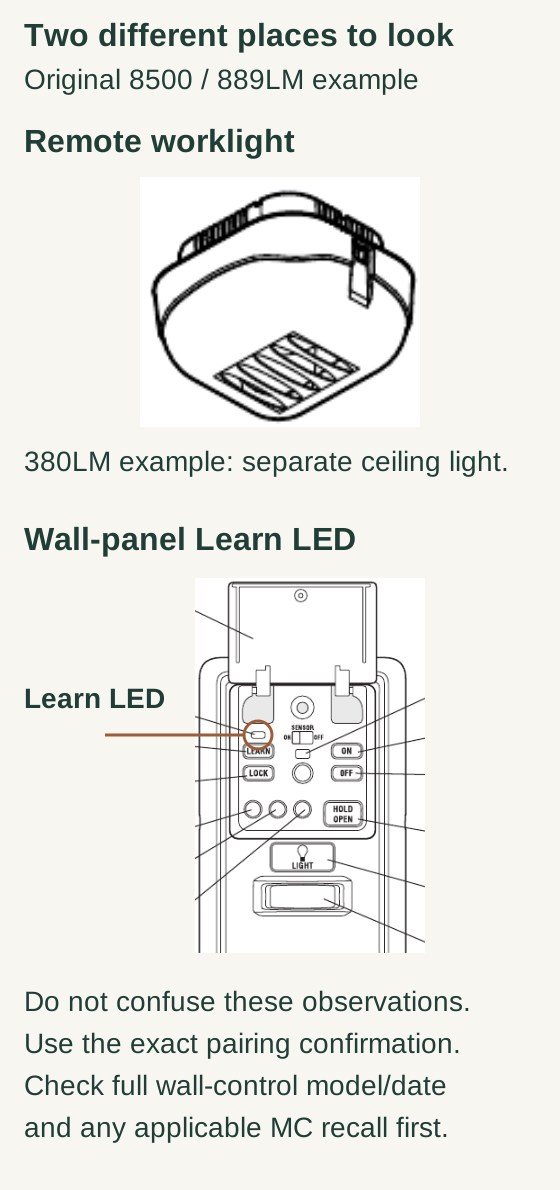
In the original 8500/889LM example, the 380LM remote worklight is a separate ceiling light. The Learn LED is on the wall panel, above its LEARN button. These are different observation points.
Use the exact pairing confirmation rather than treating either static picture as success. Retain the full wall-control model, manufacture date and applicable MC recall checks.
Test the newly assigned button once the programming state has ended. Stay clear of the doorway until movement stops. Next, check an existing household remote and any keypad you need for normal entry.
If the new remote works but earlier devices do not, do not repeatedly hold LEARN to “finish” the job. You may have selected an erasure procedure. Make an inventory of affected controls and restore them through the correct instructions only after understanding what changed.
We recommend a simple note such as “left remote button: single garage; right button: unused.” Clear labeling reduces accidental operation when there are several doors.
Troubleshooting without starting over blindly
Nothing happens at all. Verify the opener has normal power and that a known working wall control can operate a mechanically sound door. A dead receiver or power problem will not be solved by more pairing attempts.
The pairing indicator never appears. Recheck the control location. This is particularly important on the original 8500 and installations with added receivers.
One remote fails while another works. Focus on that remote's model, battery, chosen button, and compatibility before suspecting the whole opener.
The remote works only nearby. Compare performance outside the vehicle and note recently added electronics or lighting. Use the intermittent-operation guide rather than erasing all access.
Common mistakes and useful tips
Do not press several buttons together unless your actual instructions require it. Do not change force or travel settings while trying to add a remote. Keep the model labels in your private household records so a future battery change does not become another identification exercise.
If you are replacing a lost remote, adding the replacement does not itself establish that the missing one has lost access. Address that separately through the appropriate authorized memory-erasure procedure.
FAQ and key takeaways
Can a Chamberlain-branded remote work? Some cross-brand combinations are supported; verify the exact accessory rather than assuming all are.
Do I need to reset myQ first? Not simply to add an ordinary compatible remote. Phone-network setup and radio pairing are different tasks.
The main rule: identify the LiftMaster model, find its actual pairing location, and follow one complete compatible procedure. Do not turn a small access change into an unnecessary full reset.
Explore guides · About this guide
Was this guide useful?
Your choice stays in this browser only. It is not sent to us.
Sources & manuals2
Manufacturer instructions and references for this guide. Match the document to your exact product.
- LiftMaster 8500 pairing instructionssupport.chamberlaingroup.com
- 889LM manualembed.widencdn.net