How to Program a Craftsman Garage Door Opener Remote
Quick answer
To program a Craftsman garage remote, identify the complete opener and remote models, confirm that they are compatible, and select the matching learning procedure. Craftsman branding alone is not a compatibility guarantee. The Series 100 and model R-200.57933 are specifically excluded from Chamberlain Group's general LiftMaster/Chamberlain accessory compatibility guidance.
We recommend resolving that question first, especially with an older Sears-branded opener or a remote purchased separately. A transmitter that fits your hand and has the right logo may still use the wrong system.
What you need and when to stop
Gather the opener model, transmitter model, relevant wall-control model, instructions, and a battery known to be correct for the remote. A flashlight and a phone photograph help with small labels. If access requires a ladder, position it safely away from moving parts.
Allow 15–30 minutes for a straightforward identification-and-pairing job. Older hardware or an added receiver can require more research. This estimate is not a reason to rush a timed step.
Program only a garage you are authorized to manage. Check that the door is unobstructed and operates normally. Stop if you see a broken spring, hanging cable, tilted door, or damaged track. Do not change force settings to make a newly paired remote operate a struggling door.
1Find the actual model numbers
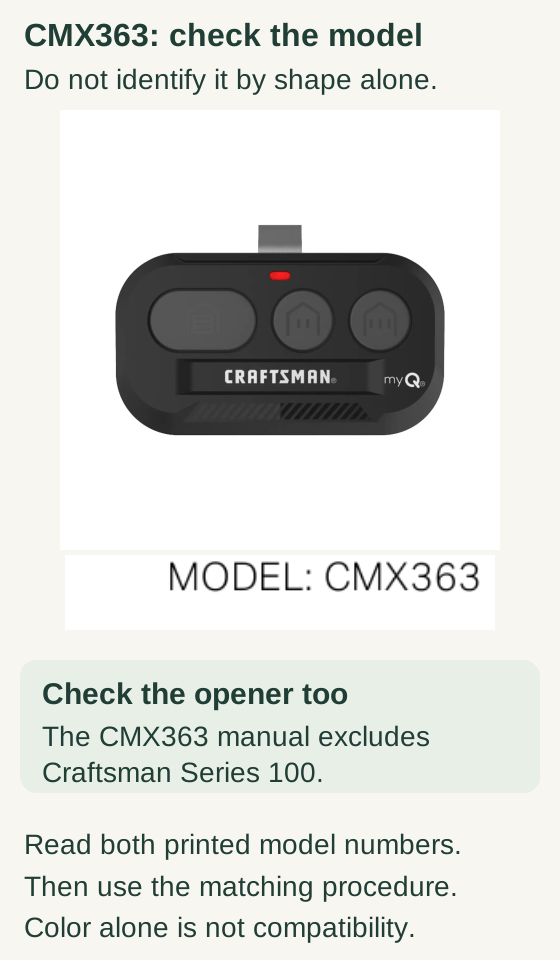
Scroll within the image if needed, or open the full-size view. The key details are also written below.
The manufacturer photograph and manual heading identify the CMX363 example. Its manual excludes Craftsman Series 100.
Read the printed remote and opener models and use their matching instructions. Shape, color and a front photograph do not establish compatibility or replace the model label.
Read the opener label rather than using horsepower, case color, or approximate age as its identity. Read the remote label separately. Include punctuation and suffixes in your notes because they help distinguish similar accessories.
If the installation has an external receiver, its model is another necessary detail. The receiver may determine the radio-pairing route rather than the motor housing's brand.
2Choose the right generation branch
For supported equipment, instructions can distinguish white, yellow, purple, red/orange, or older control systems. Do not transfer a timing rule from one generation just because both buttons are labeled LEARN.
One current example is the CMX363 remote. Its manual covers supported Craftsman openers made after 1997, with a Series 100 exception. It includes a dedicated Security+ 3.0 white-button route as well as another method for its listed compatible generations.
For an older opener with a different remote, use that opener and accessory's instructions. Do not substitute the CMX363 method below. If small code switches rather than the expected controls are present, stop this route and identify the original system; do not alter an unknown switch pattern.
3Model-gated example: CMX363 with a compatible white-button opener
CMX363: documented white-LEARN pairing
This example applies only to a CMX363 and a compatible opener using the manual’s white-LEARN route. Check both complete model numbers.
Scroll sideways for detail, or open the full-size diagram. The complete instructions are written below.
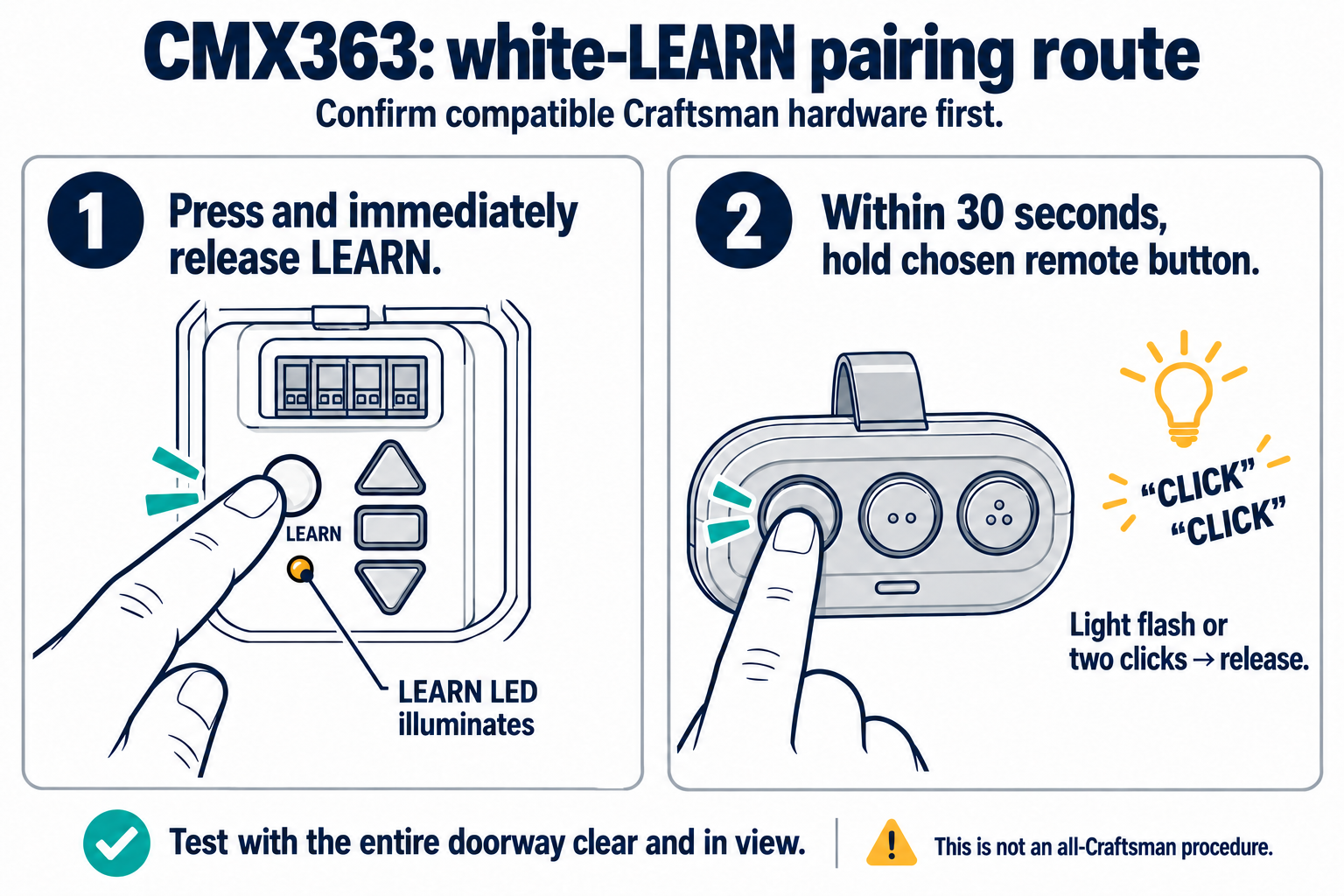
Open full-size diagram and zoom (new tab)
- Confirm the complete remote and opener models. The CMX363 manual covers Craftsman openers manufactured after 1997, excluding Series 100. Do not assume every Craftsman-branded opener uses this procedure.
- Keep the door path clear and fully in view. Confirm the opener’s light works as the programming indicator.
- Press and immediately release the white LEARN button. Its separate LEARN LED illuminates.
- Within 30 seconds, hold the chosen CMX363 operating button. Release when the opener lights flash and/or two clicks are heard.
- Test the chosen button with the doorway clear and fully in view. If unsuccessful, the manual says to wait until the LEARN LED goes out before retrying; this can take up to 3 minutes.
The current Craftsman compatibility page separately excludes Series 100 and R-200.57933 from LiftMaster/Chamberlain accessory compatibility. That page is not a substitute for confirming this specific CMX363/opener pairing.
Manufacturer reference 1 · Manufacturer reference 2
This example follows “Program Remote to Garage Door Opener with a White LEARN Button Using the LEARN Button” on page 2 of the CMX363 manual, 114-6066-000 (Rev. B).
- Clear the door's path and locate the opener's white LEARN control.
- Press and immediately release LEARN. Its indicator should remain on for the pairing window.
- Within 30 seconds, hold the CMX363 button you want to assign.
- Release it when the opener flashes its lights and/or gives the documented two-click confirmation.
- From a safe viewing position, press the assigned button to verify operation.
Do not continue this example if your hardware or indicators differ. The separate procedure on page 3 is for yellow, purple, orange or red LEARN buttons and includes different remote-preparation and confirmation steps. Do not mix it with this white-button procedure.
Separate example: CMX363 with an original Craftsman 139.53985D receiver
Use this branch only for a CMX363 remote following manual 114-6066-000 (Rev. B), paired with a Craftsman 139.53985D in its documented original 315 MHz Security+ configuration. Verify the actual model, manufacture date after 1997 and matching purple LEARN control. Do not use this example for Series 100, an unknown replacement board, or the white-button example above. Stop if the installed receiver does not match its manual.
The door can move during programming, not just during the final test. Proceed only with a mechanically sound, correctly adjusted door, working safety sensors and opener lamp, safe access to the controls, and the entire doorway clear and in view. Keep people and vehicles out of the travel path.
- Prepare the remote. Hold both smaller CMX363 buttons until its red LED is steady, typically about six seconds, then release. This hold is on the remote—not on the opener’s LEARN button.
- Briefly tap the receiver’s LEARN button. Press and immediately release the square LEARN button below its small indicator. Do not hold it: holding the receiver’s LEARN button for about six seconds erases learned codes.
- Use the remote’s specified window. Within 20 seconds of the LEARN tap, press and release the selected remote button twice. The remote’s red LED flashes intermittently. Do not substitute the receiver’s separate 30-second learning-window description for this remote’s 20-second instruction.
- Confirm when the door moves. When the door begins moving, press and release any remote button within three seconds. Keep clear and watch the door; do not treat an unrelated light flash as the movement trigger.
- Test from a safe position. With the full path clear and visible, press the programmed button. The opener should activate. If pairing fails, wait until the receiver’s LEARN indicator goes out before repeating the exact procedure. Stop if the response differs from the instructions or the door moves abnormally.
This is the LEARN-button route on page 3 of the CMX363 Rev. B manual. The 139.53985D manual identifies the receiver control and erase boundary. Do not combine this route with the older remote’s pairing recipe or the white-button procedure.
CMX363 + original Craftsman 139.53985D: separate purple-LEARN example
- Use CMX363 remote manual 114-6066-000 Rev.B with the original Craftsman 139.53985D 315 MHz Security+ receiver configuration. Verify the actual model, manufacture after 1997 and matching purple LEARN control. Stop if the board was replaced or does not match.
- This is not the white-LEARN procedure, Series 100, or a generic Craftsman family route. For a white-LEARN opener, follow its separate model-specific procedure.
- Read the entire sequence first. Door movement occurs during programming, not only during the final test. Use a sound, properly adjusted system with working safety sensors and lamp, full clear visible travel path and safe stable access. Keep people and vehicles outside the path.
- Holding the remote’s two small buttons prepares the remote. Holding the receiver’s LEARN button for about 6 seconds erases stored codes. On the receiver, press and immediately release only.
- Complete the two selected-button presses within 20 seconds of the receiver LEARN tap. If the attempt fails, wait until the receiver Learn LED is off before trying again.
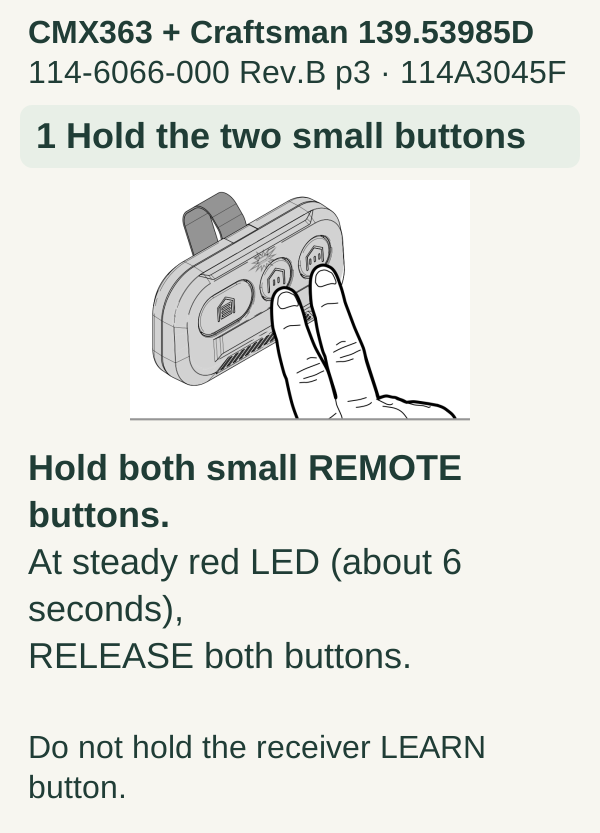
Scroll within the image if needed, or open the full-size view. The key details are also written below.
CMX363 + Craftsman 139.53985D 114-6066-000 Rev.B p3 · 114A3045F 1 Hold the two small buttons Hold both small REMOTE buttons. At steady red LED (about 6 seconds), RELEASE both buttons. Do not hold the receiver LEARN button.
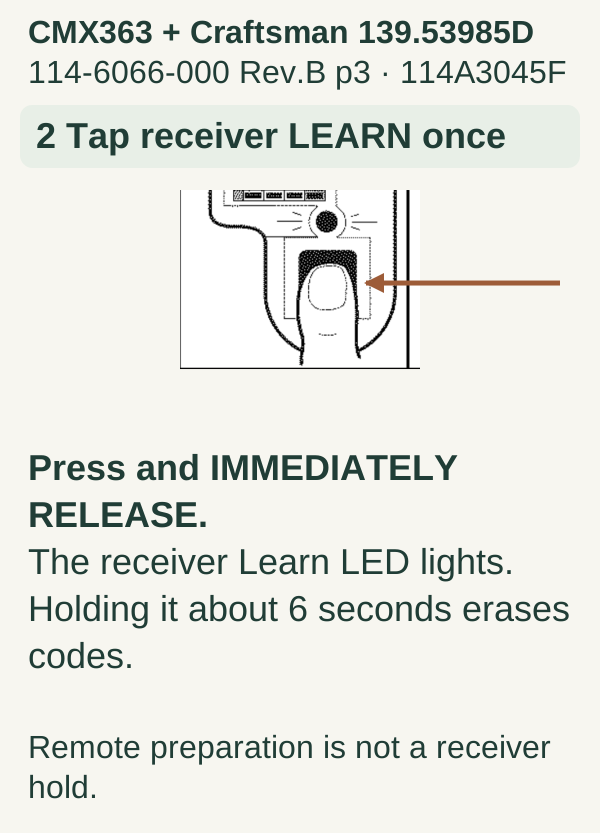
Scroll within the image if needed, or open the full-size view. The key details are also written below.
CMX363 + Craftsman 139.53985D 114-6066-000 Rev.B p3 · 114A3045F 2 Tap receiver LEARN once Press and IMMEDIATELY RELEASE. The receiver Learn LED lights. Holding it about 6 seconds erases codes. Remote preparation is not a receiver hold.
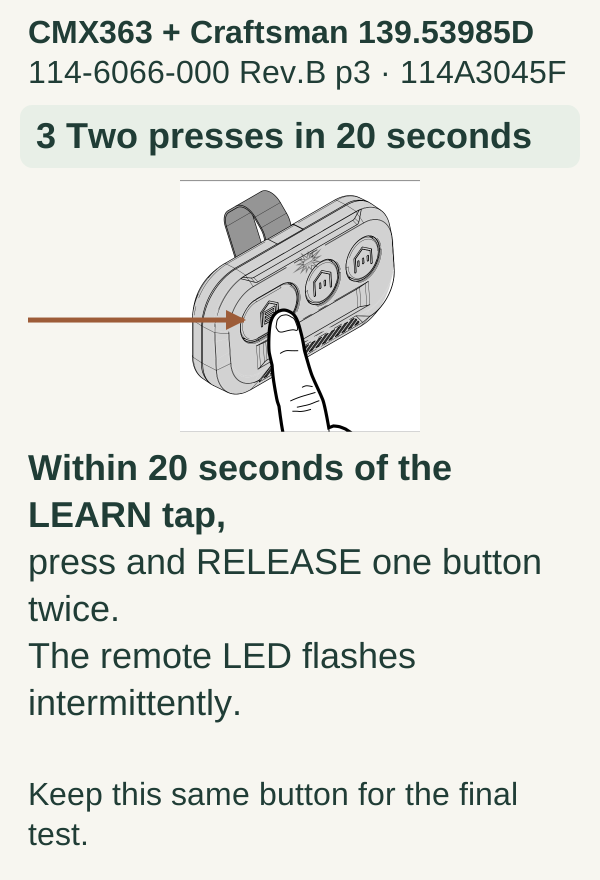
Scroll within the image if needed, or open the full-size view. The key details are also written below.
CMX363 + Craftsman 139.53985D 114-6066-000 Rev.B p3 · 114A3045F 3 Two presses in 20 seconds Within 20 seconds of the LEARN tap, press and RELEASE one button twice. The remote LED flashes intermittently. Keep this same button for the final test.
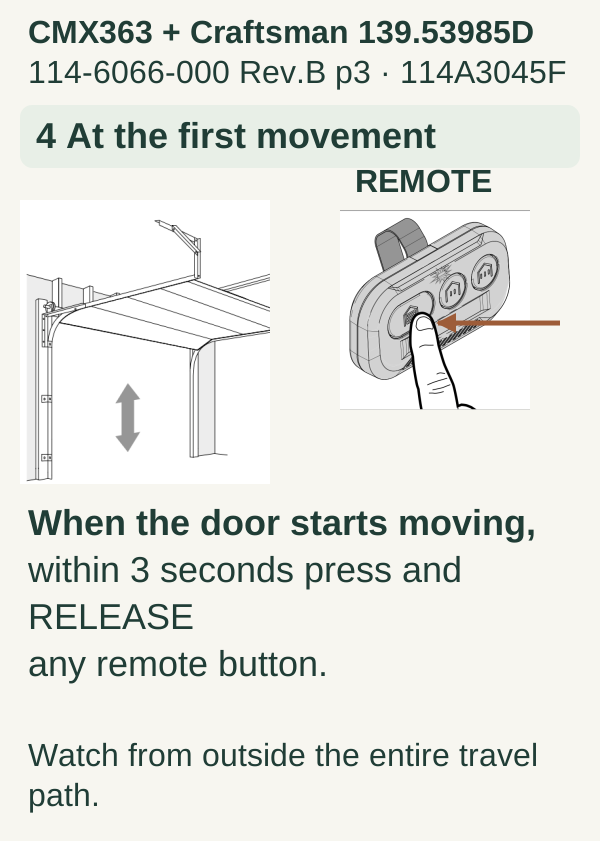
Scroll within the image if needed, or open the full-size view. The key details are also written below.
CMX363 + Craftsman 139.53985D 114-6066-000 Rev.B p3 · 114A3045F 4 At the first movement REMOTE When the door starts moving, within 3 seconds press and RELEASE any remote button. Watch from outside the entire travel path.
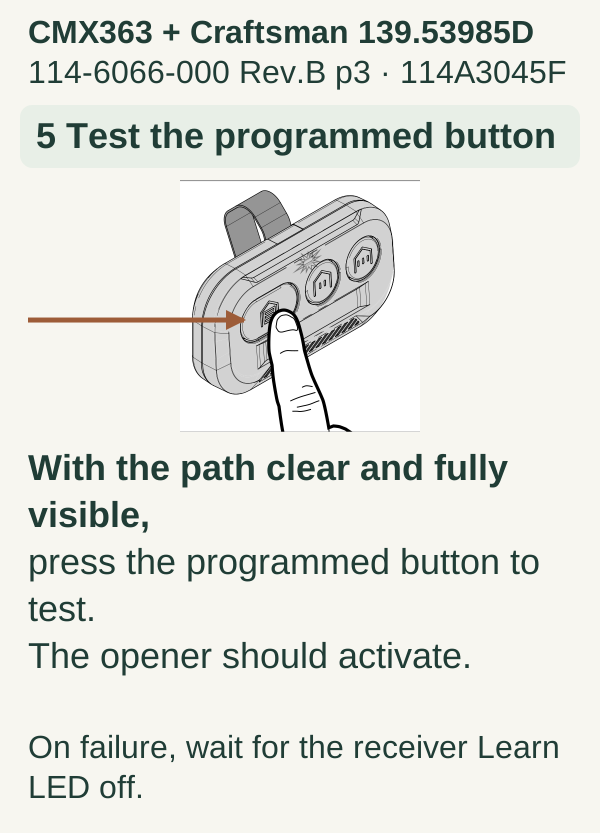
Scroll within the image if needed, or open the full-size view. The key details are also written below.
CMX363 + Craftsman 139.53985D 114-6066-000 Rev.B p3 · 114A3045F 5 Test the programmed button With the path clear and fully visible, press the programmed button to test. The opener should activate. On failure, wait for the receiver Learn LED off.
4Finish the job, not just the pairing signal
Confirm which door the chosen button operates. Then check the other controls your household relies on. Keep an alternate entry available until testing is complete.
For a multi-button remote, complete one door before assigning the next button. We recommend making a simple map in a private note: large button for the main door, another for the second door if intentionally configured, and remaining buttons left unassigned.
A flash is useful evidence during setup; it is not a substitute for confirming the intended access afterward. Conversely, if a door is mechanically unsafe, do not perform movement tests merely to prove the remote paired.
Troubleshooting by what still works
The wall control works but one remote does not. Focus on that remote's battery, model compatibility, and assigned button. Avoid resetting every household device to solve one transmitter problem.
The wall control works but all handheld remotes fail. Check the documented wall-control lock feature and compare the receiver symptoms. A wired wall control and wireless transmitters do not use identical communication paths.
Nothing operates the door. Check visible power and status indicators and investigate the opener or door symptom before pairing again. Stop if there is heat, smoke, burning odor, or damaged wiring.
The new remote opens the wrong door. Stop and review your button assignments with the relevant authorized pairing instructions. Do not keep testing from a location where you cannot see both doors.
Common mistakes and FAQ
Can I use a Chamberlain or LiftMaster accessory? Some Craftsman combinations support them; the published exceptions and exact models matter. Do not buy or configure by logo alone.
Is a six-second hold always the programming step? No. A long hold can erase codes on some equipment, while a remote preparation step may use a hold on the transmitter. Those are different controls with different consequences.
Should I reset the whole opener first? We recommend ordinary compatible pairing before considering destructive resets. If a missing remote must be removed, plan that separately.
Key takeaways
Identify the Craftsman model, respect the compatibility exceptions, and follow one complete model-specific method. Verify both the new assignment and existing household access before calling the job finished.
Explore guides · About this guide
Was this guide useful?
Your choice stays in this browser only. It is not sent to us.
Sources & manuals3
Manufacturer instructions and references for this guide. Match the document to your exact product.
- Manufacturer reference 1 · CMX363 Rev. B manualcgi.widen.net
- Manufacturer reference 2support.chamberlaingroup.com
- 139.53985D manualwww.toolservicenet.com