How to Program a Garage Door Opener to Your Car
Quick answer
To connect your car to a garage door opener, identify the car's built-in system and select instructions for the vehicle make, model, year, and opener. A common HomeLink setup has two stages: training the vehicle from a working handheld remote, then completing rolling-code learning at the opener. Finishing the first stage may not finish the job.
We recommend keeping a working handheld remote available until the vehicle button has been tested. Do not clear all vehicle buttons just to add one garage door.
What you need and how long it takes
Have your vehicle owner's manual, the opener model, the built-in transmitter's identity, and a working compatible handheld remote when the selected instructions require it. Use a fresh correct remote battery if its condition is uncertain. A second adult can assist with an opener learning window.
Allow about 20–40 minutes, including identification and testing. Integrated displays and older compatibility issues can add time. Park outside the garage, apply the parking brake, and keep the door visible. Follow the vehicle's prescribed ignition state; never run a combustion engine inside an enclosed garage for programming.
Keep children, pets, and other people out of the doorway. Only configure a garage and vehicle you are authorized to manage.
1Identify the vehicle system
Not every mirror button, dashboard control, or connected-car feature is HomeLink. Find the system name in the vehicle manual. If it is HomeLink, select the vehicle in HomeLink's programming selector; the company notes that interfaces vary by model year and vehicle.
If the manual describes another transmitter system or an app-based service, use that route instead. A HomeLink sequence is not a general way to configure every car's garage feature.
2Check the opener and any compatibility requirement
Record the garage opener model and generation. Verify that the existing handheld transmitter reliably operates it from a safe viewing position. If the handheld remote already fails, solve that problem before using it as a training signal.
HomeLink identifies a compatibility bridge as relevant to certain older HomeLink generations and specific Chamberlain-family opener combinations. That does not mean every unsuccessful attempt needs an adapter. Check the exact pairing before buying or installing extra equipment.
A useful distinction: a car can learn a transmitter signal yet still need the opener's authorization stage. That situation is different from the car never recognizing the handheld signal at all.
3Train one vehicle button using the selected instructions
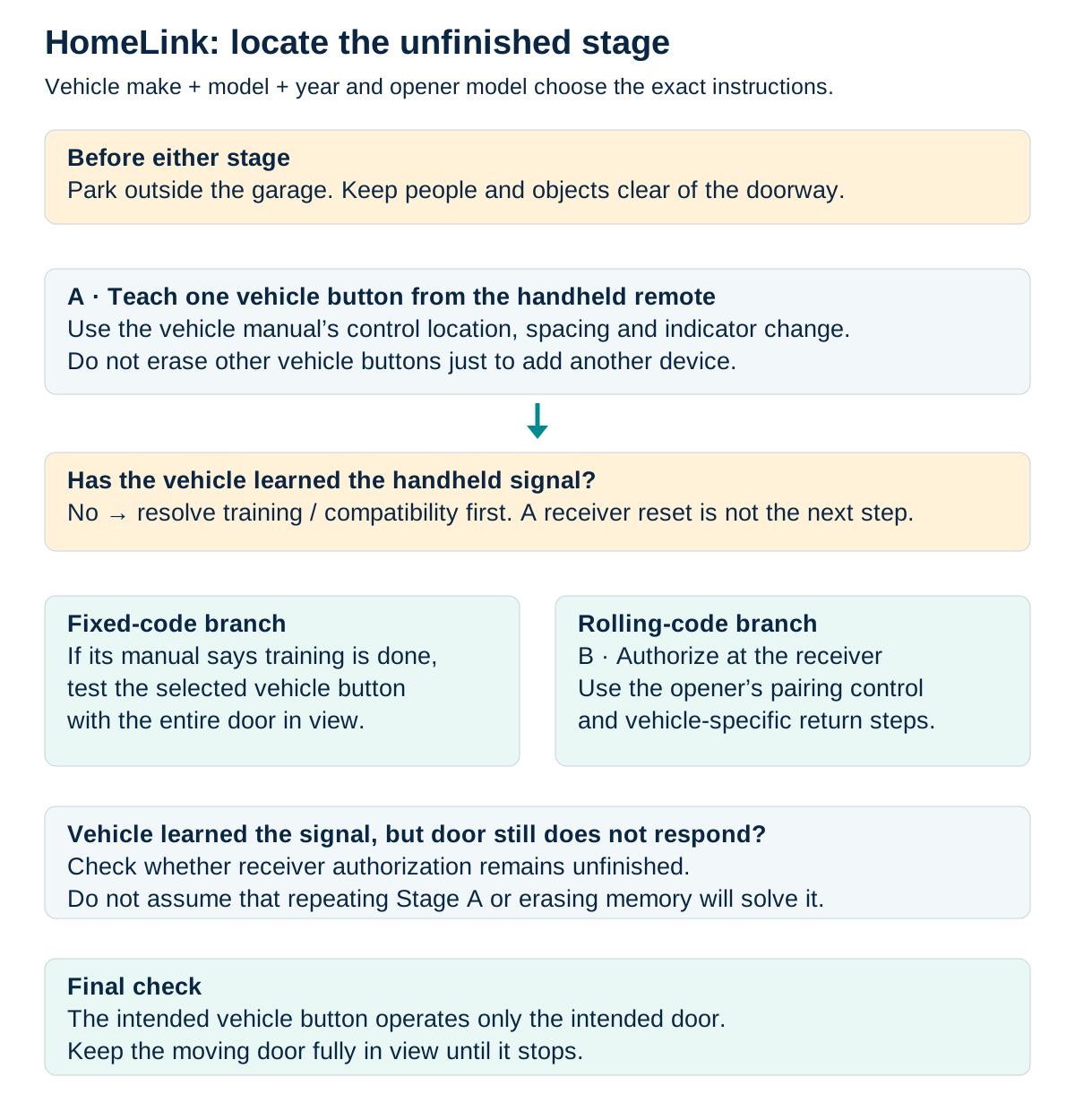
HomeLink learning and receiver authorization
Use the vehicle owner’s manual for the exact make, model and year. A vehicle learning a signal and an opener authorizing that vehicle are separate stages.
Scroll sideways for detail, or open the full-size diagram. The complete instructions are written below.
Open full-size diagram and zoom (new tab)
- Use the vehicle owner’s manual as the primary training reference. Record make, model, year and the opener model; location and procedure vary.
- Park outside the garage with people and objects clear of the door. Stage A teaches the selected vehicle button from a compatible handheld remote using the exact manual’s spacing and indicator checkpoint.
- If that learning stage has not succeeded, resolve it first. Do not erase receiver memory as a substitute.
- A compatible fixed-code route may be ready to test after learning. A rolling-code route can require separate receiver authorization and the vehicle-specific return sequence.
- If the vehicle learned the signal but the door does not respond, check whether receiver authorization remains unfinished. Do not claim this proves the cause.
- Test the intended door with its entire path clear and fully in view. Do not clear existing vehicle buttons merely to add another.
Manufacturer reference 1
Choose an unused button or the documented single-button replacement method. Follow your vehicle's instructions for positioning the handheld transmitter and operating the two controls. Watch the vehicle's indicator for its stated change.
Do not begin with a full memory clear unless you deliberately want to remove all stored vehicle assignments. A button for another garage, gate, or lighting system may be useful and difficult to restore without its owner present.
If the indicator never reaches the training confirmation: recheck the working remote, battery, and specified position. Adjust only as the selected guide permits. Repeating the same attempt dozens of times without a changed observation is not useful evidence.
2024 Ford Mustang US: HomeLink vehicle-training stage only
- Use only a 2024 Ford Mustang (CZJ), US branch, with factory HomeLink if equipped and a previously unused selected button. This is not a universal vehicle procedure.
- Park outside the garage. Switch the vehicle ignition on but keep its engine off. Use only a sound door with working safety reversal, and keep its full path clear and visible.
- Use your working original handheld transmitter with a fresh correctly installed battery. Keep it for future use. The left HomeLink button is the selected example shown; use only an unused button.
- If the first tap does not make the vehicle indicator flash, stop and consult the exact vehicle manual. Do not automatically hold for 20 seconds, reprogram a used button or hold the outer pair; clearing the outer pair erases all stored vehicle codes.
- The handheld-training stage does not prove rolling-code receiver pairing is complete. If the two-second press/release test still does not operate the door after at most one repeat, stop and follow the exact identified opener’s receiver-learning branch. No generic motor-button location is supplied.
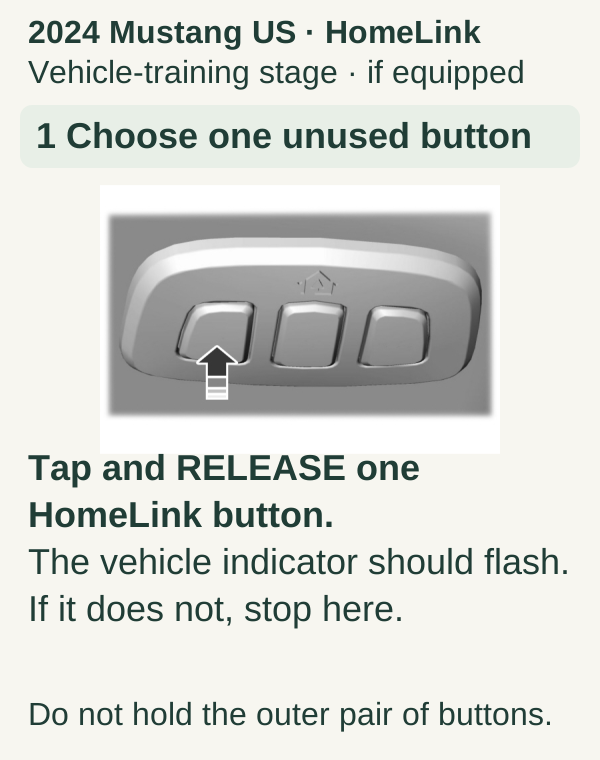
Scroll within the image if needed, or open the full-size view. The key details are also written below.
2024 Mustang US · HomeLink Vehicle-training stage · if equipped 1 Choose one unused button Tap and RELEASE one HomeLink button. The vehicle indicator should flash. If it does not, stop here. Do not hold the outer pair of buttons.
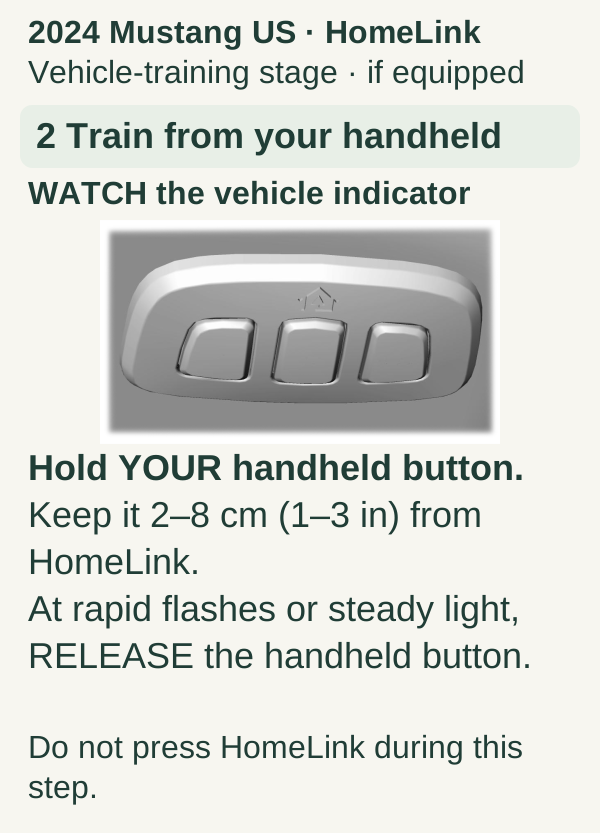
Scroll within the image if needed, or open the full-size view. The key details are also written below.
2024 Mustang US · HomeLink Vehicle-training stage · if equipped 2 Train from your handheld WATCH the vehicle indicator Hold YOUR handheld button. Keep it 2–8 cm (1–3 in) from HomeLink. At rapid flashes or steady light, RELEASE the handheld button. Do not press HomeLink during this step.
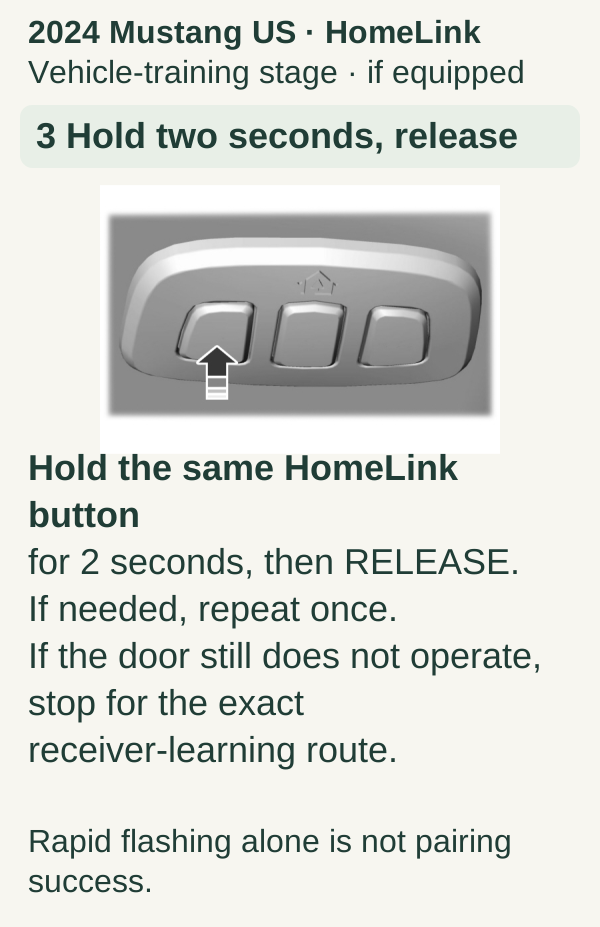
Scroll within the image if needed, or open the full-size view. The key details are also written below.
2024 Mustang US · HomeLink Vehicle-training stage · if equipped 3 Hold two seconds, release Hold the same HomeLink button for 2 seconds, then RELEASE. If needed, repeat once. If the door still does not operate, stop for the exact receiver-learning route. Rapid flashing alone is not pairing success.
4Complete the rolling-code stage when required
For a compatible rolling-code opener, the selected instructions may next require the opener's LEARN/PROGRAM control and a return to the vehicle within a stated window. Have the route clear and the second adult ready before starting.
Use the exact timing and number of vehicle-button activations given for your vehicle/opener combination. We do not combine the 20-second window from one general guide with the 30-second window in another manufacturer's example. Those differences are precisely why model selection comes first.
Watch the expected opener confirmation or door movement. If the window ends, restart that stage as directed rather than holding LEARN longer. A prolonged hold can erase existing opener access on some models.
5Test from the normal driving position
Once setup ends, test the car button while parked safely with the door visible. Confirm that the correct door moves. Keep the handheld remote until you are satisfied the vehicle control works consistently from your ordinary approach location.
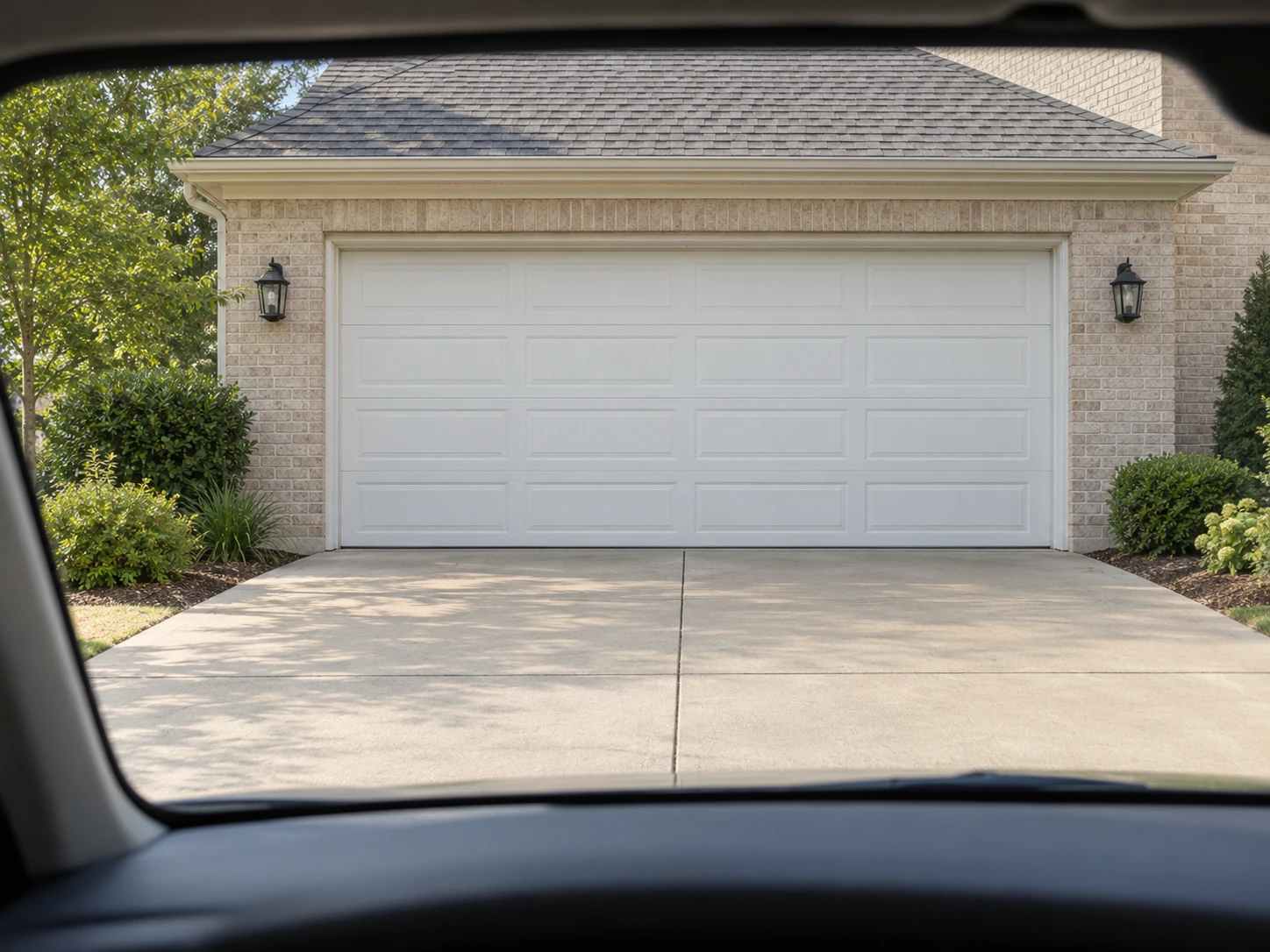
Test while parked outside with the full door and its path in view. This viewpoint does not identify a vehicle’s controls or replace its ignition and programming instructions.
Next, verify an existing household remote and keypad if they should remain active. If all older devices suddenly fail, stop and investigate an unintended memory erase rather than assuming the car has taken exclusive control.
We recommend documenting the vehicle button assignment in a private household note. Do not record access codes on a card visible through the windshield.
Troubleshooting by stage
| Observation | Next useful check |
|---|---|
| Vehicle never learns the remote signal | Correct vehicle instructions, working remote, fresh battery, permitted positioning |
| Vehicle shows training confirmation but door stays still | Required rolling-code stage and compatibility |
| Works outside the car but poorly inside | Vehicle placement or shielding and range diagnosis |
| Garage opens but refuses to close | Closing obstruction or safety-system problem |
| Other household remotes stop working | Possible unintended opener-memory erase |
Common questions
Can I program the car without a handheld remote? Some vehicle systems and setup modes offer different routes, but many traditional training procedures require a working transmitter. Use the exact vehicle instructions rather than assuming every HomeLink supports remote-free setup.
Should I erase the previous owner's vehicle buttons? If you own the vehicle, removing unwanted stored assignments is a separate deliberate task. It does not grant permission to operate the previous owner's garage.
Why does a successful training light not open the door? The car may have learned the signal without completing receiver authorization. Check the next stage before starting over.
Key takeaways
Identify the vehicle system, train one chosen button, and complete the opener's required authorization stage. Preserve other assignments and keep exact timing tied to the actual vehicle and opener models.
Explore guides · About this guide
Was this guide useful?
Your choice stays in this browser only. It is not sent to us.
Sources & manuals1
Manufacturer instructions and references for this guide. Match the document to your exact product.
- Manufacturer reference 1homelink.com