How to Reset a Garage Door Opener Without Erasing the Wrong Settings
Quick answer
There is no single garage door opener reset. First decide whether you need to restart electronics, remove radio access, reconnect Wi-Fi, or perform a documented factory reset. Each has different consequences. A reset is not a repair for a broken spring, damaged cable, or binding door.
We recommend writing the desired outcome in one sentence before pressing anything: “Restore the app after a router change” is a much more useful goal than “reset everything.”
Choose the smallest change that matches the problem
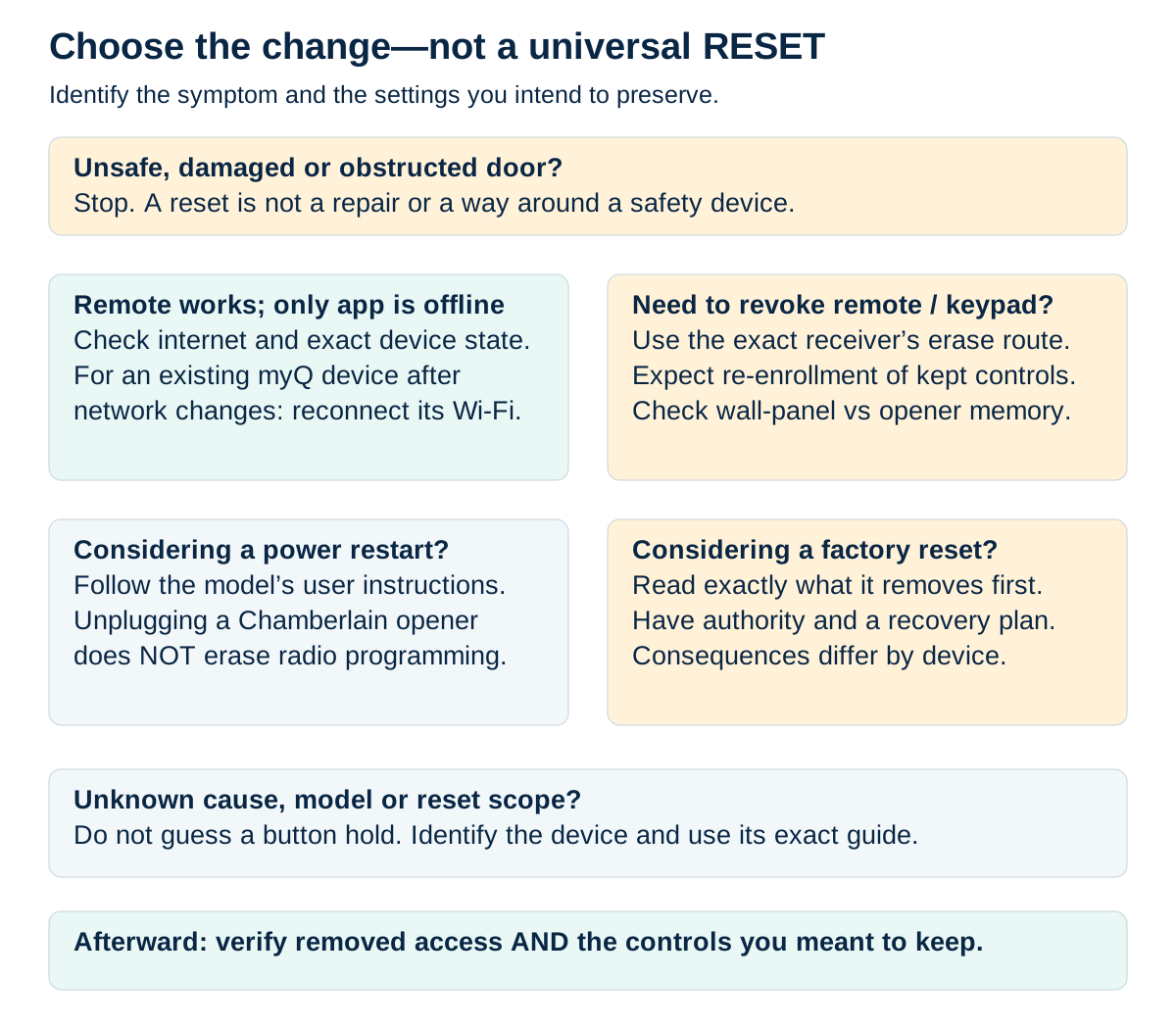
Choose the operation for the problem
Stop for a damaged, obstructed or unsafe door. A reset cannot repair a mechanical fault or replace the safety system.
Scroll sideways for detail, or open the full-size diagram. The complete instructions are written below.
Open full-size diagram and zoom (new tab)
- An unsafe, damaged or obstructed door needs appropriate repair or clearance—not a reset to bypass safety.
- If a local remote works while myQ is offline, investigate the network/device state; that observation is not a complete diagnosis. Existing-device reconnection can address a router or credential change.
- To revoke radio access, follow the exact receiver’s erase instructions and plan re-enrollment. Distinguish wall-panel memory from opener memory.
- Unplugging a Chamberlain opener does not erase remote programming. Follow model instructions for any restart; battery-backed equipment can remain powered.
- Before factory reset, identify the model-specific consequences, authority and recovery plan. Verify both removed access and retained controls afterward.
Manufacturer instructions · Additional manufacturer reference · Network reconnection guidance
| Situation | Start here | Avoid assuming |
|---|---|---|
| One remote stopped working | Battery and remote diagnosis | Every device must be erased |
| Lost or stolen remote | Authorized radio-memory management | Unplugging removes its access |
| App offline after new router | Network reconnection | The door's travel settings need changing |
| Door reverses or stops unevenly | Door/safety diagnosis | More force or a reset will make it safe |
| Manufacturer directs a factory reset | Exact model's reset instructions | All products erase the same data |
This decision matters because a working keypad, vehicle button, and app may be separate access paths. Removing one path is not proof that all the others changed.
What you need and how long to allow
Have the opener's complete model, the symptom or access goal, its instructions, and a list of controls you need afterward. If changing network settings, have the authorized Wi-Fi credentials available privately. Keep an alternate authorized entrance accessible.
Allow 15–30 minutes for initial diagnosis. A deliberate full reconfiguration can take longer, especially with several remotes and vehicles. Do not begin an all-device erase just before someone depends on garage access.
Clear the doorway before any test. Stop if the door is crooked, a spring is visibly separated, a cable is loose, or electrical parts smell hot. Keep people away and arrange the appropriate service rather than experimenting with resets.
1Record the evidence before changing it
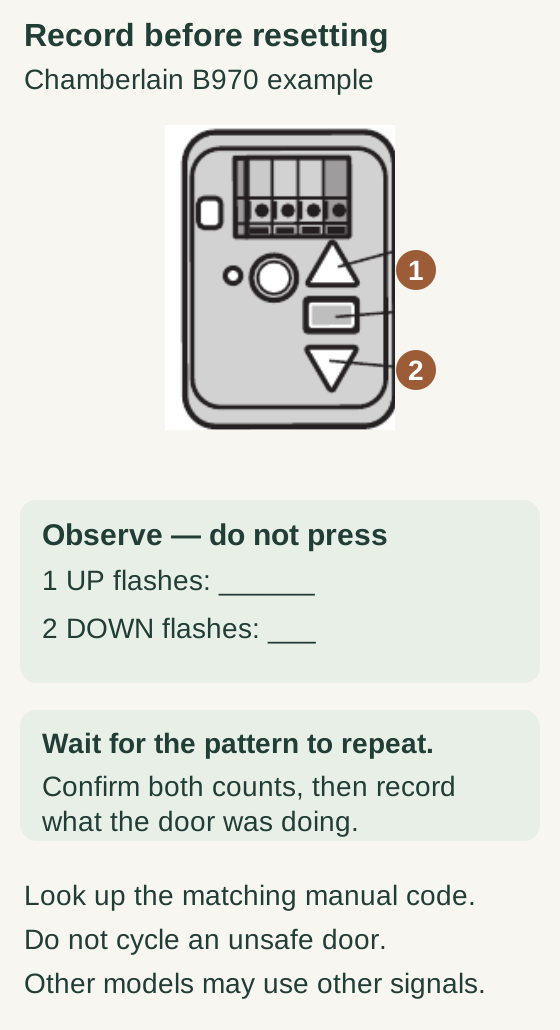
Scroll within the image if needed, or open the full-size view. The key details are also written below.
On the Chamberlain B970 example, callout 1 identifies the UP arrow and callout 2 the DOWN arrow. Observe without pressing controls. Record both flash counts and what the door was doing, confirming the repeating pattern before changing settings.
The blank fields are for your observations, not a diagnostic result. Look up the matching manual code. Do not cycle an unsafe door; other models may use different signals.
Note which controls work: wall button, handheld remote, keypad, vehicle, and app. Record indicator colors and the exact error text. If the problem follows a power outage, router replacement, battery change, or recent programming attempt, record that too.
Do not repeatedly cycle the door to collect more observations if it sounds strained or moves unevenly. A single safe observation can be enough to stop mechanical testing.
2Understand what a power restart can and cannot do
A manufacturer-directed power cycle restarts electronics. It does not automatically revoke stored remote access. Chamberlain Group explicitly states that unplugging its opener does not erase remote programming, even over a long interval.
Use the exact model's power-cycle instructions when troubleshooting calls for one. A backup-equipped opener may remain powered after its mains plug is removed, so do not assume unplugging has fully isolated it. Only access a user-serviceable battery compartment as directed; do not open a mains enclosure.
After restoring power, test the original symptom once under safe conditions. If it recurs, record that outcome instead of repeating the same restart indefinitely.
3If the goal is access removal, plan the restore first
Make an inventory of the remotes, keypads, and vehicle transmitters that should continue working. Find their pairing instructions before deliberately clearing radio memory. On systems with an all-device erase, every intended device must be enrolled again.
Check connected-account access separately. Genie's remote-memory guidance, for example, distinguishes radio devices from Aladdin Connect and certain wall controls. A radio reset is therefore not a universal account reset.
We recommend testing a known old transmitter immediately after the erase, before re-enrolling it, when safe. That establishes whether the intended access change actually occurred.
4If the goal is network recovery, stay on the network route
Identify whether the opener has built-in Wi-Fi or uses a separate hub. Use its app's existing-device reconnection process when the network changed. Do not delete the device or change account ownership merely because it shows offline.
If the app says the device belongs to another account, stop the ordinary troubleshooting route. Resolve ownership through the authorized owner and manufacturer process. Physical proximity to a garage is not permission to take over its account.
5Reserve factory reset for a defined reason
Read exactly what the chosen reset removes and what must be set up again. Chamberlain's current factory-reset guidance warns that applicable Wi-Fi opener resets can erase remotes, keypads, vehicle programming, and connected accessories. Product-specific consequences matter.
Do not chain long button holds from unrelated online instructions. A first hold, repeated hold, adjustment button, and wall-panel command can serve different purposes. If the button layout does not match the instructions, stop rather than guessing.
Verify and keep a useful record
After the intended change, test only the functions affected and the access that should remain. Record the model, action taken, confirmation observed, and unresolved symptom. Keep PINs and credentials out of that general maintenance record.
If nothing improves: the reset may have addressed the wrong layer, or a component may need diagnosis. Preserve the new evidence instead of erasing more settings.
Common questions and key takeaways
Will a reset fix sensors? It will not remove an obstruction, repair damaged wiring, or make a misaligned safety system dependable. Diagnose the actual fault without bypassing protection.
Can I reset without losing remotes? Some troubleshooting restarts preserve them; memory erasure does not. Name the operation before performing it.
The best reset is the smallest documented change that solves the identified problem. Keep door safety, radio access, network connection, and account ownership as separate decisions.
Explore guides · About this guide
Was this guide useful?
Your choice stays in this browser only. It is not sent to us.
Sources & manuals3
Manufacturer instructions and references for this guide. Match the document to your exact product.
- Manufacturer instructionssupport.chamberlaingroup.com
- Additional manufacturer referenceembed.widencdn.net
- Network reconnection guidancesupport.chamberlaingroup.com