Why Is My Garage Door Opener Beeping? Identify the Alert Before Silencing It

Quick answer
A beeping garage door opener may be reporting backup-power operation, a battery problem, a closing warning, an obstruction alert on covered models, or a setup/connection state. Identify which device is sounding, its model, the beep pattern, and the accompanying light before trying to silence it.
We recommend recording the alert first. Removing a battery or resetting the opener may stop the sound while also removing useful evidence or disabling backup operation.
Start with the source of the sound
Stand clear of the door and listen for whether the sound comes from the motor unit, wall panel, separate hub, or another nearby device. A smoke alarm, carbon-monoxide alarm, or household appliance can sound as though it is above the garage door.
Do not disable an unidentified life-safety alarm. If a smoke or carbon-monoxide alarm is sounding, follow that alarm's emergency instructions rather than treating it as an opener battery issue.
If the opener has smoke, burning odor, abnormal heat, or damaged wiring, stop using it and obtain appropriate help. Do not remove the electrical cover to find a buzzer.
What you need and how long to allow
Have the opener and accessory model numbers, a timer or phone, and the matching manual. Record a short sequence from a safe location, without standing under the door or provoking repeated movement.
Allow about 10–15 minutes to identify and classify the alert. Battery replacement, an outage, or a network repair can take longer. A diagnosis time estimate is not a promise that the beeping can safely be stopped immediately.
1Record a complete alert pattern
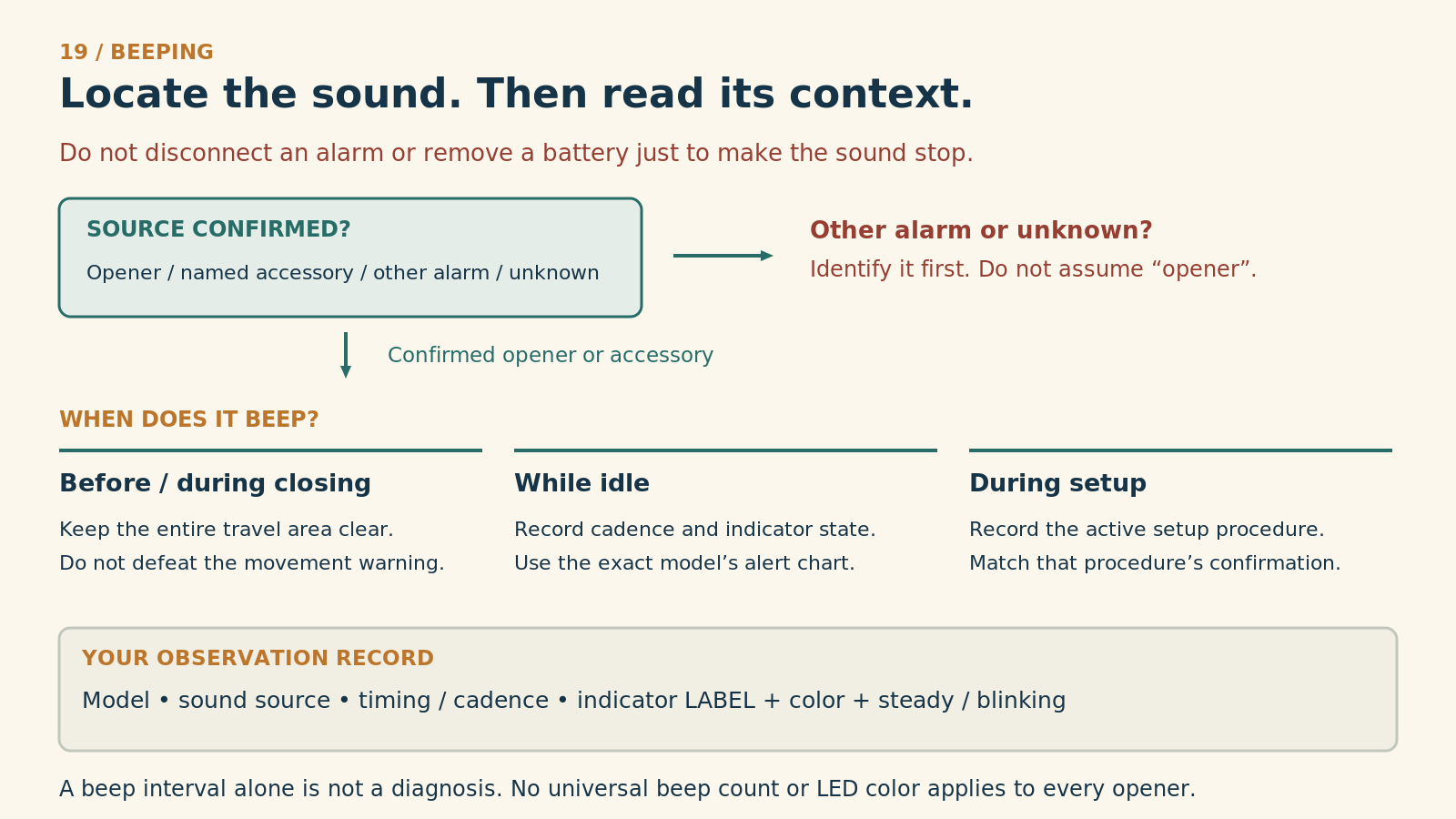
Locate the sound. Then read its context.
Do not disconnect an alarm or remove its battery just to stop a sound. If the source is another warning device—or remains unknown—identify it and follow that device’s instructions, not a garage-opener chart.
1. Confirm the source
Opener, named accessory, another alarm, or unknown? Observe from a safe location. Do not climb near moving equipment or open a cover to follow the sound.
2. When does it beep?
Before / during closing
Keep the entire door travel clear. Do not defeat a movement warning.
While idle
Record cadence and indicator state. Read the exact model’s alert chart before choosing an action.
During setup
Record the active procedure. Match its documented confirmation; do not infer a battery fault from beeping alone.
3. Record the actual observation
- Model and source
- Opener or accessory model; where the sound was confirmed.
- Timing and cadence
- Before movement, during movement, idle or setup; sequence and measured interval if safely observable.
- Indicator identity
- Exact label, color, and whether steady or blinking. Different indicators can share a color.
- Possible next check
- Use that model’s manual to interpret the combination. If the model or indication is uncertain, ask manufacturer support.
Stop routine use for repeated unexpected motion, damaged hardware or uncertain support. The chart does not provide universal beep codes or instruct battery disconnection.
Reference
Chamberlain — Why is the garage door opener beeping? Numeric/model-specific codes are not generalized.
Write down these details:
- Device making the sound.
- Repeating interval or number of beeps in a group.
- LED color and whether it is steady or blinking.
- Whether the door is idle, moving, or about to close.
- Whether power was recently lost or setup buttons were pressed.
2Example: covered Chamberlain/LiftMaster backup-battery alerts
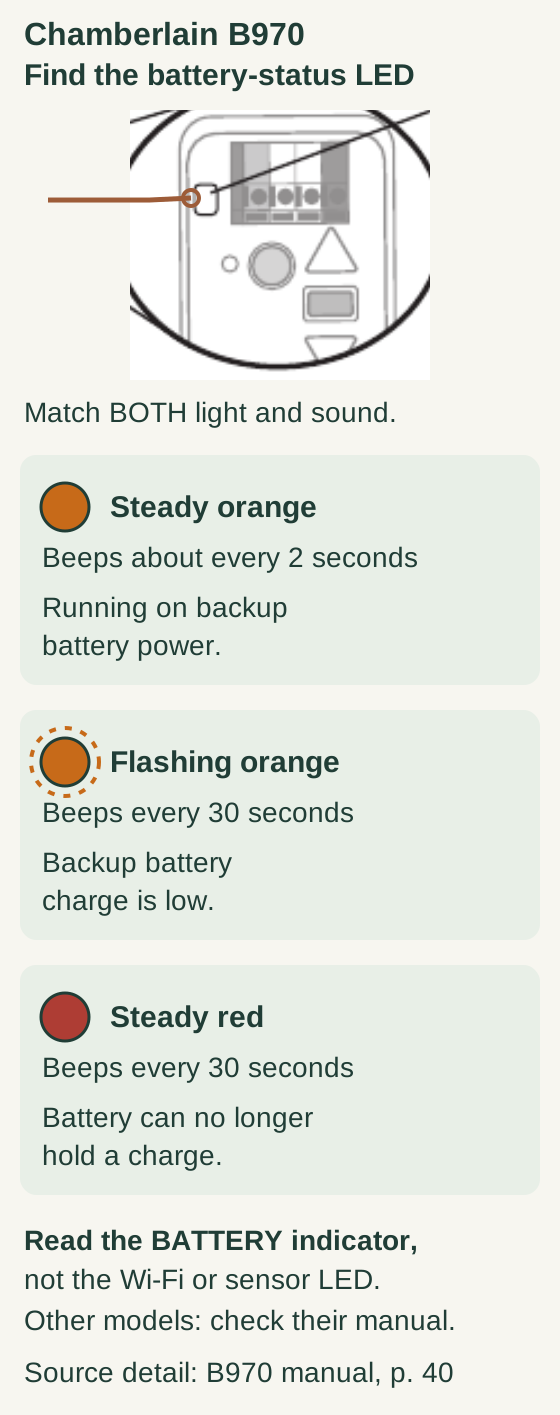
Scroll within the image if needed, or open the full-size view. The key details are also written below.
For the B970 battery-status indicator: steady orange with beeps about every two seconds means operation on backup battery power. Flashing orange with beeps every thirty seconds indicates a low backup battery. Steady red with beeps every thirty seconds indicates that the battery can no longer hold a charge.
Read the battery-status light shown in the model detail, not a Wi-Fi or sensor light. Other models need their own manual; this is not a battery-disconnection or silencing procedure.
For the battery-backup models covered by Chamberlain Group's beeping guide:
| Beep and battery LED | Documented meaning |
|---|---|
| About every two seconds, steady orange | Operating on backup power |
| About every 30 seconds, flashing orange | Low backup battery |
| About every 30 seconds, steady red | Battery cannot recharge and needs replacement |
Use this table only when the model's manual matches that alert scheme. Do not apply it to a Genie, a separate hub, or every later opener. The light and operating context are part of the identification, not optional details.
If normal mains power is absent, establish whether there is a household outage. If power appears available but the unit continues reporting backup operation, follow the model's power-supply diagnosis rather than simply replacing the battery.
3Distinguish a warning before movement
Some connected or timer-to-close systems intentionally sound before closing. If the alert begins when a supported unattended-close command is issued, keep the doorway clear and check the exact model's documented warning behavior.
Do not disconnect a speaker or cover an alarm to make the garage quieter. A pre-movement warning serves a different purpose from an idle battery-fault beep.
If movement begins without an expected command or the door behaves unpredictably, stop routine use and investigate the unexpected-operation branch. A warning sound does not make unexplained movement acceptable.
Beeping after an obstruction stop or reversal
On Security+ 2.0 equipment covered by Chamberlain’s obstruction-notification guidance, contact with an obstruction can cause a stop while opening or a reversal while closing, accompanied by beeping and flashing lights. Availability depends on the model and its software or logic board; this is not a universal beep code. Keep clear and stop repeated operation. Do not change force settings or provoke another collision to identify the alert. Follow the exact model’s diagnostics; unexplained reversal, damage or uncertain door support needs professional assessment.
4Distinguish Wi-Fi setup sounds
A beep that occurs only during app setup or after pressing programming controls may belong to the connection process. Record the corresponding Wi-Fi LED and identify built-in opener Wi-Fi versus a separate hub.
For the covered built-in myQ Wi-Fi troubleshooting, different LED/beep combinations correspond to different connection stages. Use that exact guide rather than treating every three-beep sound as a battery failure or factory-reset confirmation.
We recommend noting what was pressed immediately before the sound. “Three beeps after a network-control hold” is different evidence from “three beeps while idle every minute.”
5Plan the appropriate remedy
If the matched diagnosis calls for backup-battery replacement, use the opener's approved battery and its user-serviceable replacement instructions. The handheld remote's coin cell is not a substitute for the motor unit's backup battery.
Do not improvise a battery pack or disconnect unknown wiring. If the compartment or procedure is not safely accessible, arrange service. If a replacement battery fails to resolve the documented fault after the specified charging/setup process, investigate the charging or power system rather than replacing batteries repeatedly.
If the problem is network setup, follow that device's reconnection route. If it is an expected closing warning, the task may be understanding normal operation rather than silencing it.
Common mistakes and questions
Can I remove the battery to stop the beep? Do not do that before identifying the alert. Removing backup power changes outage behavior and is not the same as repairing the fault.
Does every 30-second beep mean a dead battery? No. Even the example above distinguishes a low battery from one that cannot recharge by the LED state. Other products use different patterns.
I replaced the remote battery. Why does it still beep? The remote and opener backup system are separate devices. Identify the sound source and correct battery.
Can I ignore it because the door still moves? Continued movement does not establish that the alert is harmless. Read the matched warning and address its cause.
Key takeaways
Identify the sounding device, record the pattern and LED, and use the exact model's alert chart. Restore the intended function rather than merely making the sound disappear.
Explore guides · About this guide
Was this guide useful?
Your choice stays in this browser only. It is not sent to us.
Sources & manuals1
Manufacturer instructions and references for this guide. Match the document to your exact product.
- Chamberlain — Why is the garage door opener beeping? · Chamberlain’s obstruction-notification guidancesupport.chamberlaingroup.com