How to Program a Garage Door Keypad
Quick answer
A garage keypad usually needs both a valid PIN and a compatible connection to the opener. Identify the keypad model, check the opener generation, and follow the complete initial-programming procedure. Creating a PIN on the keypad does not necessarily mean the opener has learned it.
We recommend deciding whether you are installing a new keypad, changing a known PIN, or recovering authorized access after a forgotten PIN. Those are different tasks, and a full opener reset is rarely the sensible first move.
What you need
Have the keypad model, opener model, matching instructions, correct batteries, and a private PIN chosen before you begin. A flashlight helps with small labels. A ladder may be needed to reach the authorized programming controls safely.
Allow around 20–30 minutes for identification, pairing, and verification, excluding any new mounting work. Keep another authorized entry available. Only manage a keypad for a property you own or have permission to administer.
Keep people and objects out of the door's path. The door can move during setup. Do not program a keypad as a workaround for a door that is crooked, binding, or visibly damaged.
1Match the keypad, not just its appearance
Read the label behind the cover or battery compartment as described in the accessory instructions. Two devices with similar numeric layouts may have different programming logic. A Clicker universal keypad, a Genie GK, and a Chamberlain 940EV should not share one memorized sequence.
Check that the exact keypad supports the actual opener or external receiver. For Chamberlain-family devices, a LEARN-button color can help identify the generation, but model and revision restrictions still apply. Do not extend an older keypad chart to a new opener without a documented compatibility match.
2Choose a private PIN and understand the test
Pick a PIN that fits the keypad's specified length and is not a published example. Avoid obvious household clues such as an address or a simple repeated digit pattern. Keep it out of screenshots, labels on the keypad, and public maintenance notes.
Decide in advance what success will look like: the documented programming confirmation, correct-door operation with the new PIN, and retained access through other authorized controls. If replacing a keypad, also decide how the old device's access will be handled; adding the new one is not the same as revoking the old one.
3Example: initial setup for 940EV or 877MAX
940EV: preparation and the separate receiver-learning stage
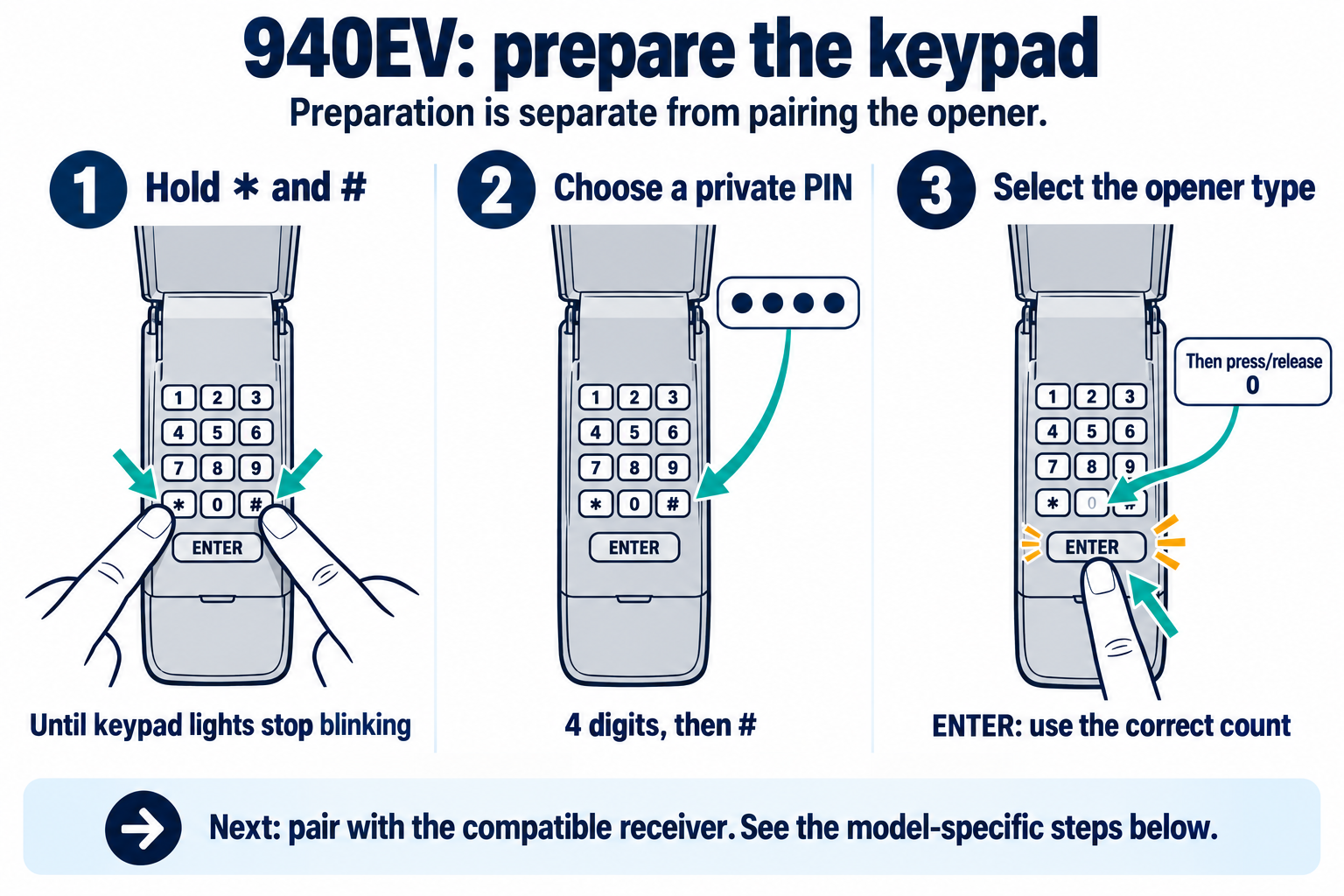
This 940EV image shows keypad preparation. Receiver learning is a separate required stage below. Confirm the exact keypad suffix and supported receiver before using either stage.
Scroll sideways for detail, or open the full-size diagram. The complete instructions are written below.
Open full-size diagram and zoom (new tab)
- This illustration covers the 940EV preparation stage, not the entire pairing procedure. Confirm compatible receiver and exact suffix first.
- Hold * and # together until keypad lights stop blinking. Enter a private four-digit PIN, then #.
- Press/release ENTER for your opener type: yellow Security+ 2.0 once; purple Security+ 315 MHz twice; red/orange Security+ 390 MHz three times; green Billion Code 390 MHz four times. Then press/release 0.
- For the conventional opener route documented in the 940EV manual: press/release opener LEARN; its LED lights. Within 30 seconds enter your PIN, then press/release ENTER until opener lights flash or two clicks occur.
- Original 8500 uses its wall control rather than the motor adjustment controls: use the exact 8500 wall-panel route instead of the conventional opener step.
- Test with the door path clear and fully in view. Do not infer white-button compatibility or use this chart for an unidentified keypad.
Manufacturer instructions · Additional manufacturer reference
For 940EV/877MAX with an explicitly supported older opener using the documented motor-unit LEARN route, use this sequence. Original LiftMaster 8500 exception: an 877MAX pairs through the compatible 888LM/889LM wall panel, with a different sequence. Its motor-unit LEARN button is for travel/force setup. Use the manufacturer’s 8500 keypad branch instead of the sequence below.
- Hold star and pound until blinking stops.
- Enter a four-digit PIN; press pound.
- Press ENTER once for yellow, twice for purple, three times for red/orange, or four times for green; press zero.
- Briefly press opener LEARN.
- Within 30 seconds, enter the PIN and press/release ENTER until a flash or two clicks confirms pairing.
- Test PIN plus ENTER.
Do not extend this model-specific chart to an unlisted generation or accessory.
B970 + 940EV: receiver-learning stage after preparation
- Complete 940EV keypad preparation first: hold * and # until blinking stops; enter a private four-digit PIN and #; press ENTER once for the yellow-LEARN branch; press and release 0.
- This series uses the B970 motor-unit LEARN route, not the wall-panel MENU route. It is the receiver-learning stage, not the full keypad-initialization procedure.
- Use a sound door, a working opener lamp and a clear, fully visible travel path. Read the complete procedure before pressing LEARN.
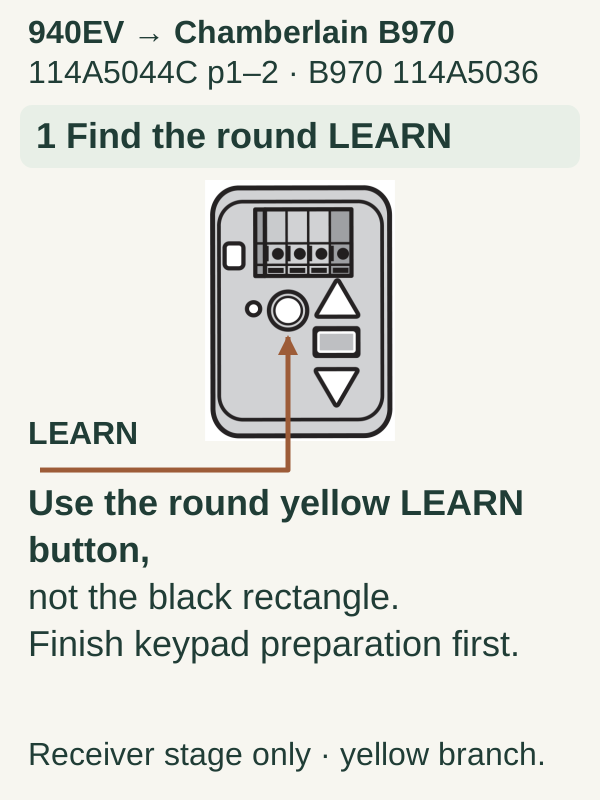
Scroll within the image if needed, or open the full-size view. The key details are also written below.
After completing the 940EV preparation above, locate the round yellow LEARN button on the B970 motor unit, not the black adjustment rectangle. This is the receiver-learning stage only.
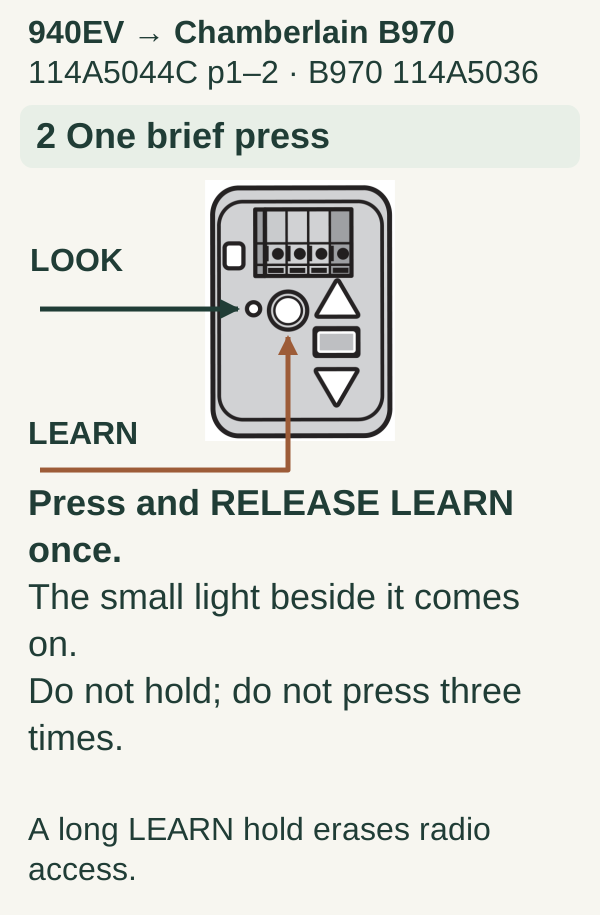
Scroll within the image if needed, or open the full-size view. The key details are also written below.
Briefly press and release LEARN once. The small indicator beside it comes on. Do not hold the button or use three taps; a long LEARN hold erases radio access.
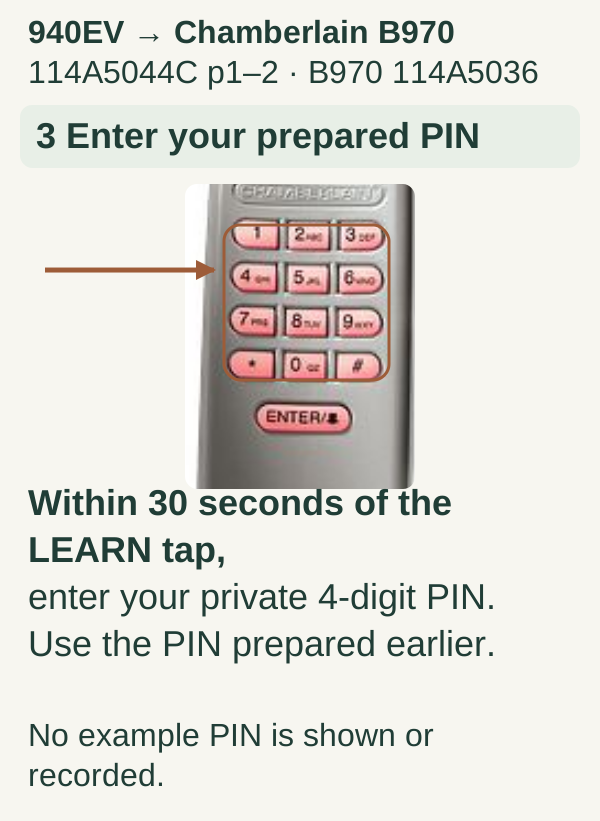
Scroll within the image if needed, or open the full-size view. The key details are also written below.
Within 30 seconds of the LEARN tap, enter the private four-digit PIN already prepared on your 940EV. No example PIN is needed or recorded.
Scroll within the image if needed, or open the full-size view. The key details are also written below.
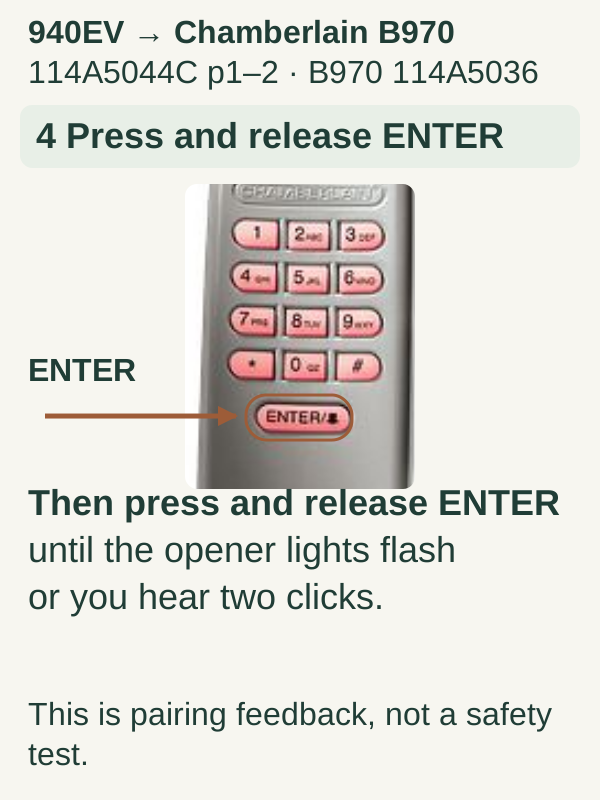
Press and release the 940EV ENTER button until the opener lights flash or two clicks are heard. This is pairing feedback, not a door-safety test.
Scroll within the image if needed, or open the full-size view. The key details are also written below.
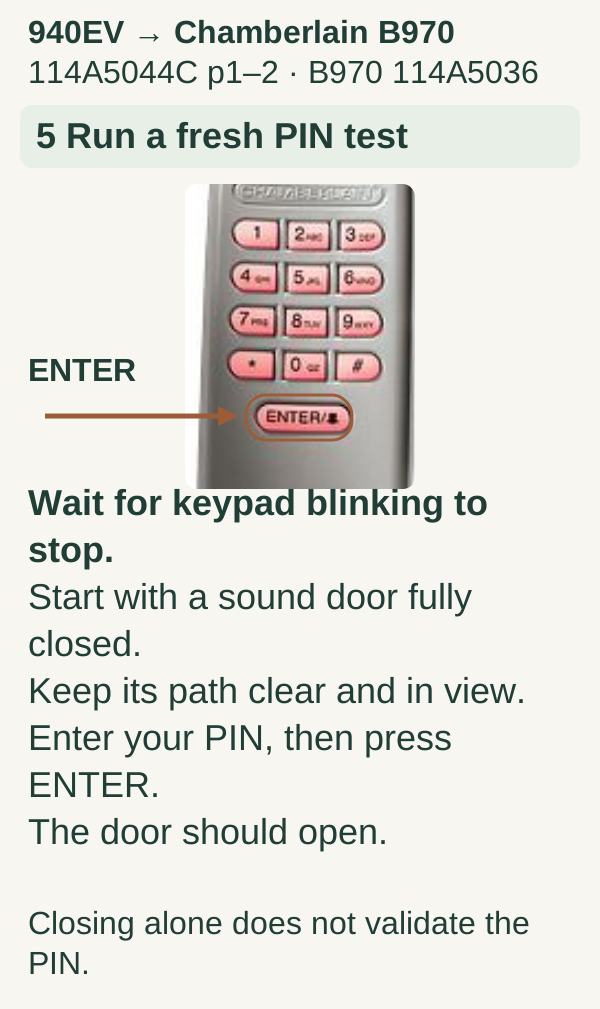
Wait for keypad blinking to stop. Start with a mechanically sound door fully closed and the full path clear and visible. Enter your PIN, then press ENTER. The door should open. Closing alone does not validate the PIN.
4Let the keypad return to its normal state
Scroll within the image if needed, or open the full-size view. The key details are also written below.
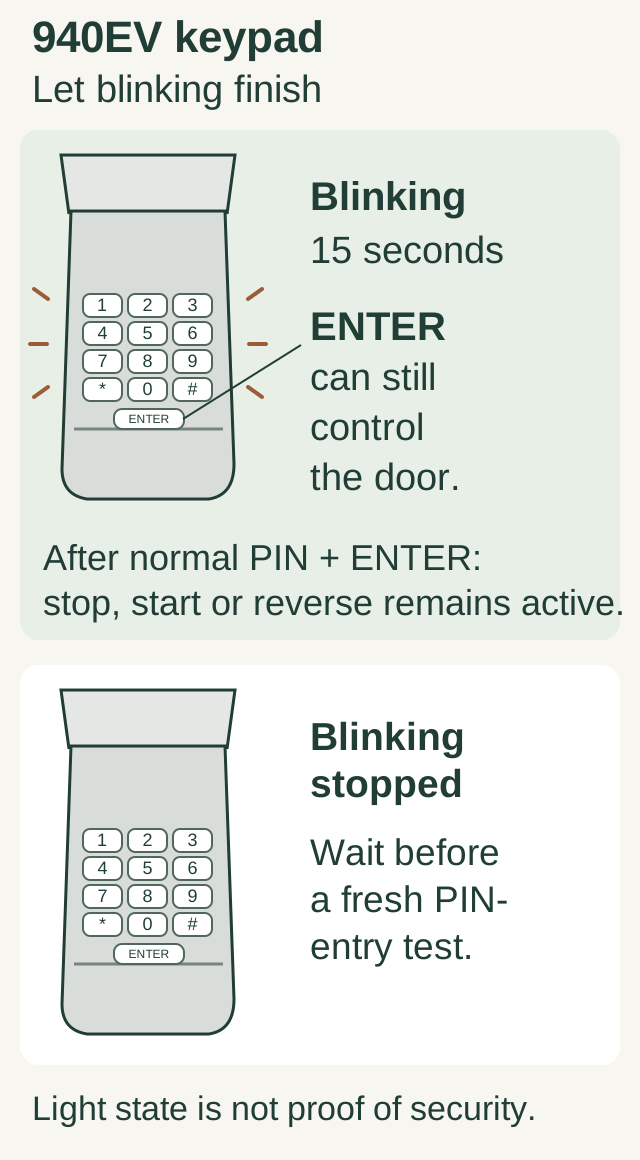
For this 940EV example, ENTER can still control the door during the 15-second blinking window after normal PIN + ENTER operation. Wait until blinking stops before a fresh PIN-entry test. The light state alone does not prove security; keep the door visible and the travel area clear.
After programming, allow any documented active-entry window to expire before deciding whether an old code still works. Some keypads intentionally accept a simpler follow-up command for a short period after a valid entry. Testing too quickly can therefore create a misleading result.
For example, Genie's GK guidance distinguishes a stored PIN from the keypad's temporary active period. Use that exact model's operating instructions when interpreting a second button press. Do not assume a keypad is insecure solely because you tested it while it was still in an authorized active state.
We recommend completing PIN tests carefully with the whole doorway visible, not repeatedly cycling the door while someone else walks through.
5Confirm the final setup
Test the assigned door from the keypad's intended location. Check an existing remote that should remain authorized. For a multi-door keypad, verify each door-selection step separately and record the assignments privately.
If you are mounting a new unit, follow its specified location and height, keep it clear of moving hardware, and complete the manufacturer's safety checks. This programming guide does not authorize drilling into unknown wiring routes or changing the door's structural hardware.
Troubleshooting and common mistakes
The keypad stays dark: check its battery type, orientation, and shipping tab. No backlight does not automatically mean the opener lost its programming.
The keypad responds but the opener does not: separate PIN setup from pairing. Confirm you completed both stages for compatible models.
The door opens but will not close: examine the closing symptom and safety-sensor status. Do not bypass the sensors or increase force.
The new PIN works but an old one appears to work too: let the keypad's documented active period end, then retest. Check temporary-PIN features separately.
Common questions
Will removing the batteries erase the code? That is model-specific; do not rely on battery removal as an access-revocation method.
Can I use this procedure to change a known PIN? Use the shorter model-specific PIN-change procedure when supported. Initial pairing may be unnecessary.
What if I do not know the existing PIN? Use the authorized recovery route with legitimate access to the opener and its instructions. Do not guess codes or use a claimed universal master PIN.
Key takeaways
A keypad has its own model, battery, PIN state, and opener connection. Identify those pieces separately, complete the right setup route, and verify the result after any active-entry window has expired.
Explore guides · About this guide
Was this guide useful?
Your choice stays in this browser only. It is not sent to us.
Sources & manuals3
Manufacturer instructions and references for this guide. Match the document to your exact product.
- Manufacturer instructionsembed.widencdn.net
- Additional manufacturer referencesupport.chamberlaingroup.com
- manufacturer’s 8500 keypad branchsupport.chamberlaingroup.com